Fin's Custom Helpdesk integration lets you bring the power of Fin to your in house helpdesk system. In this system you give Fin access by providing endpoints for Fin to read and write conversation data.
The integration uses a pull-based architecture where:
- Fin pulls data from your endpoints when needed
- Fin pushes answers back to your system
- You notify Fin of changes via webhooks
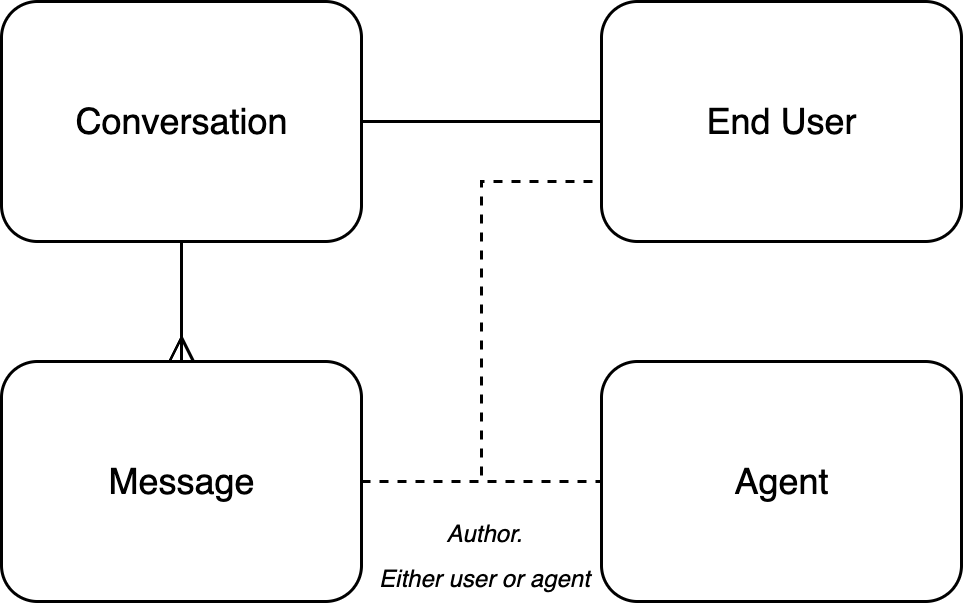
The integration revolves around four core data objects:
- Conversation - At it’s core, Fin works on conversations between an organization and an end-user. In our system, a conversation has a single end-user.
- Message - An individual message within a conversation. A conversation is made up of many messages, and a message may be from an end-user, or an agent. For the purposes of the custom help center integration, we treat Fin itself as an agent.
- End User - The end user a conversation is with – your customer.
- Agent - An employee within your helpdesk system who may respond to conversations.
In this API design, Fin pulls the data from your system when it needs it. You may notify Fin that the conversation has changed on their side by sending a webhook to the new hooks /custom_helpdesk_conversation_event with the ID of the conversation that has changed. Debouncing, locking, and data consistency concerns are handled within the Fin system itself.
The API endpoints are provided by you via the Deployment UI and specify exactly which URLs Fin should hit. Authorization tokens and webhook signing secrets would also be configured at this point.
This diagram shows a simplified version of the API calls made during synchronization. The “Custom Helpdesk Fin API Wrapper” represents the custom endpoints you would build to implement the integration specification. “Bespoke” here intends to represent that bespoke work that needs to be done in the external system for each request.
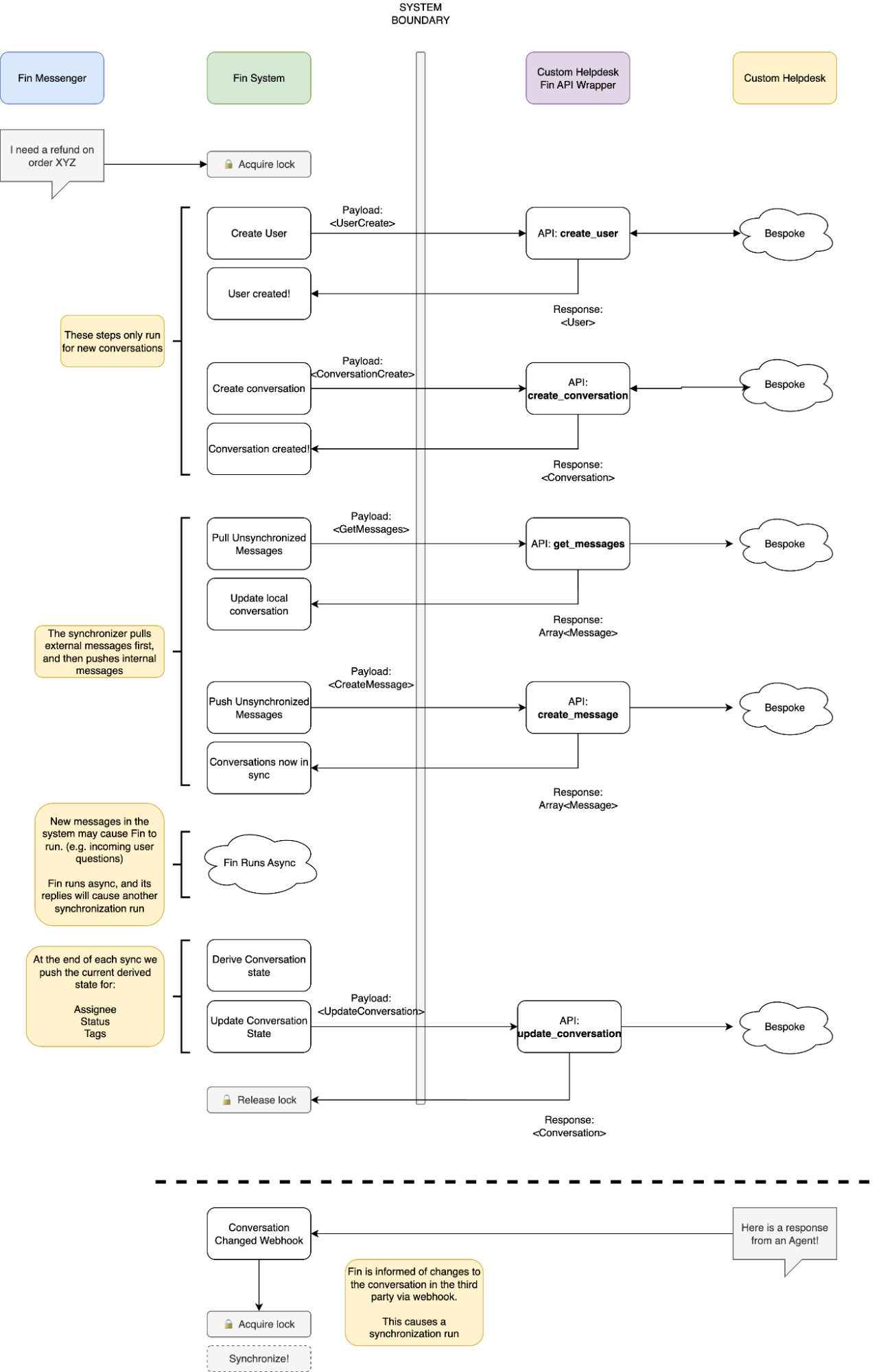
The API endpoints are how Fin interacts with the four core data models mentioned previously. The internal logic of these endpoints is entirely up to you to implement. When a conversation is synchronized into Fin, it can then perform tasks, answer questions, etc – the entire Fin product is available.
Note that conversation / user state is updated on each inbound / outbound event. For example, if the end user sends a message through the Fin Messenger or their user data is updated through a Workflow, we will synchronize data between our system and the external system. Similarly, if we receive a webhook from the external system, we will synchronize data between the two systems. This includes things like messages in the conversation, conversation state, user attributes, etc.
We will call the create_conversation and create_message endpoints to send Fin's responses to your helpdesk. The get_agents endpoint is used only on initial setup of the integration to allow you to select the agent in your system that represents Fin. In other words, after creating an agent profile for Fin in your helpdesk, you can select the same agent on Fin setup to represent Fin in create_message calls.
If Fin is unable to answer an end user's question, we will attempt to handover the conversation to your helpdesk for a human agent to pick up. This involves calling your "Update Conversation" endpoint with a null assignee_id to indicate that Fin is no longer involved in the conversation.
The Fin Custom Helpdesk integration has multiple layers of retry logic to handle transient failures.
Failed synchronization jobs are automatically retried up to 5 times with a 1 minute delay between each attempt. Errors are logged on each retry and can be viewed in the Error logs section of your Custom Helpdesk integration settings.
If Fin receives a 401 Unauthorized or 403 Forbidden response from your API endpoints, it will automatically:
- Trigger an authentication token refresh (if a token is configured)
- Retry the request once with the refreshed credentials
This allows the integration to gracefully handle expired tokens without manual intervention.
If Fin fails to create an external conversation (e.g., your create_conversation endpoint returns an error), Fin handles this gracefully by:
- Adding a reply to the Intercom conversation: "Something went wrong, please try again later"
- Ending the Intercom conversation (closing it and preventing further end-user replies)
This ensures the end user is informed that something went wrong rather than being left waiting indefinitely.
To ensure secure communication, we support two-legged OAuth for outbound requests to your API and webhook signature verification for inbound requests to Fin.
See Authentication for more information.
Our API and Webhooks reference provides complete information on expected request / response formats to integrate with Fin.
Note that the names of the endpoints are set by the custom helpdesk's API. They do not need to conform to the names given in our API spec (e.g. create_message).