` (note: h3-h6 appear as h2)
- Text formatting: `` (bold), `` (italic)
- Links: ``
- Images: `![]() ` (can be linked)
- Line breaks: `
` (can be linked)
- Line breaks: `
`
- Code blocks: ``
- Lists: `` (unordered), `` (ordered)
Example HTML:
```html
Heading 1
Heading 2
Heading 3
Heading 4
Heading 5
Heading 6
Normal paragraph with a link, bold,
italic, and a line break
right here.


- Unordered item 1
- Unordered item 2
- Ordered item 1
- Ordered item 2
console.log('hello world!');
```
---
## **Agent & Conversation Management**
**Q: Does the get_agent API need conversation ID parameters?**
**A:** No. `get_agent` is only used during initial Fin configuration to select which agent represents Fin in the external system. You can return a single hardcoded bot agent here.
**Q: How will Intercom inform us that a human agent needs to join a conversation?**
**A:** Intercom sends an `update_conversation` call with `assignee_id` set to null.
---
## **Attributes & Data Structure**
**Q: Are conversation-level attributes separate from user attributes?**
**A:** Yes. Structure is:
```json
{
"conversation": {
"attributes": {
// conversation-specific data like locale, topic, sentiment, order_id
},
"user": {
"id": "...",
"type": "end-user",
"name": "...",
"attributes": {
// user-specific custom attributes
}
}
}
}
```
**Q: When EndUser attributes change, will update_conversation be called?**
**A:** Yes. Conversation and user state is synchronized on each inbound/outbound event (new messages, user data updates via workflows, for example an Email Collector step, etc.).
---
## **Request Verification**
**Q: How do I verify that incoming requests are genuine?**
**A:** We provide two extra headers on our requests to your servers:
- `X-Fin-Request-Timestamp` - This is the timestamp of the request (in seconds since epoch). You may use this to reject requests that are too old.
- `X-Fin-Signature` - This is the SHA256 HMAC signature of `{timestamp}:{request_body}`. You may use this to verify the authenticity of the request from us.
Note as there is no body for GET requests, we instead sign: `{timestamp}:{request_params_sorted_alphabetically}`.
The HMAC key used to validate the signature is found in your deployment settings.
---
## **Connecting Fin to your endpoints**
**1** - Navigate to the Deploy > Fin Messenger section in your Fin Workspace.
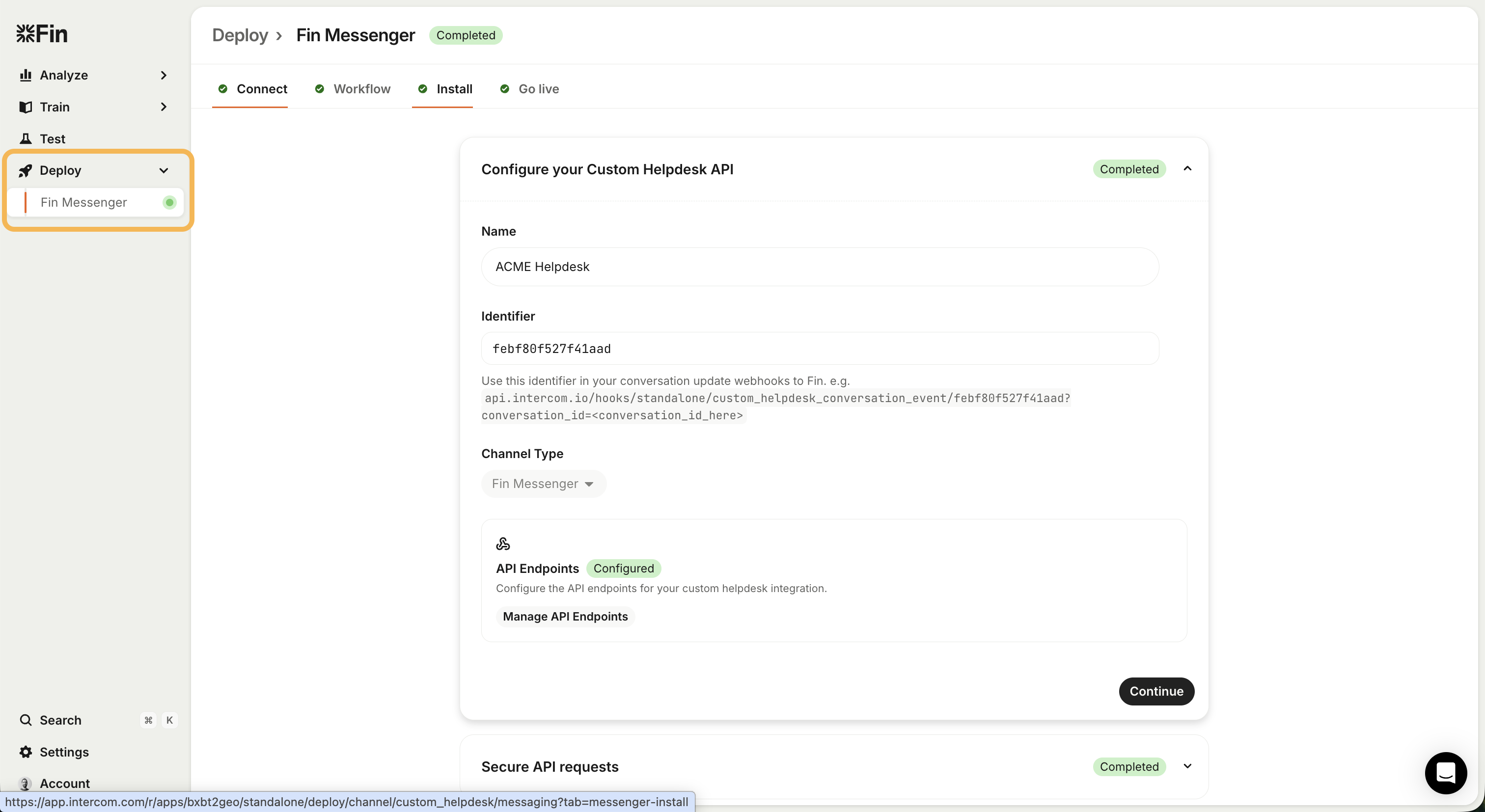 **2** - You can give your integration a name to identify it. We will support multiple different connections later (e.g. for multiple different sub-brands you may have)
Please note that "Channel type" is currently static with the value "Fin messenger". We will support other channel types at a later time.
Make note of the *Identifier* value you are given here. This is the identifer you must use in your webhooks back to the Fin system.
**3** - Configure your API endpoint URLs. What these endpoints are for and the request/response format is described in the rest of these docs.
**2** - You can give your integration a name to identify it. We will support multiple different connections later (e.g. for multiple different sub-brands you may have)
Please note that "Channel type" is currently static with the value "Fin messenger". We will support other channel types at a later time.
Make note of the *Identifier* value you are given here. This is the identifer you must use in your webhooks back to the Fin system.
**3** - Configure your API endpoint URLs. What these endpoints are for and the request/response format is described in the rest of these docs.
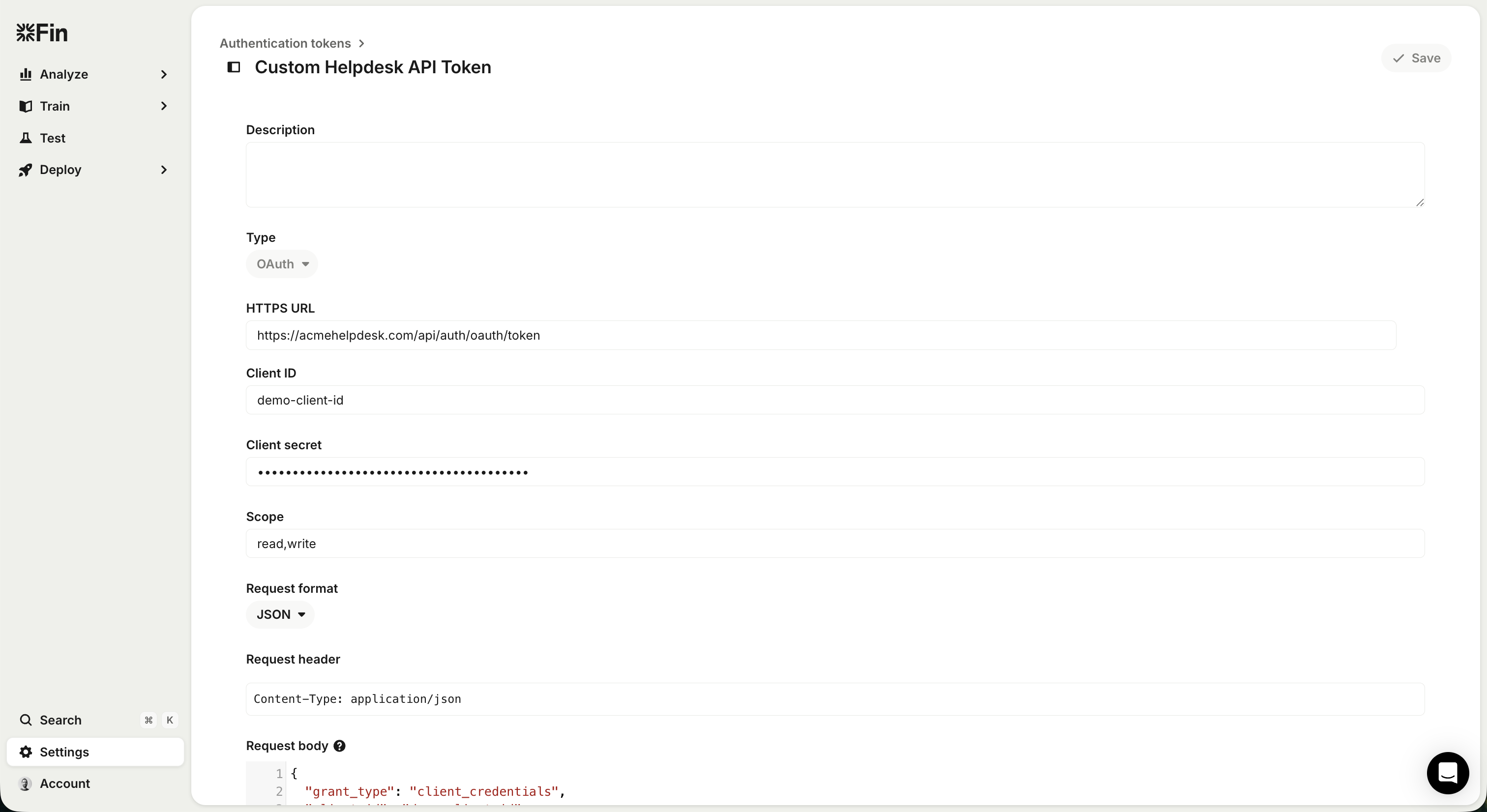
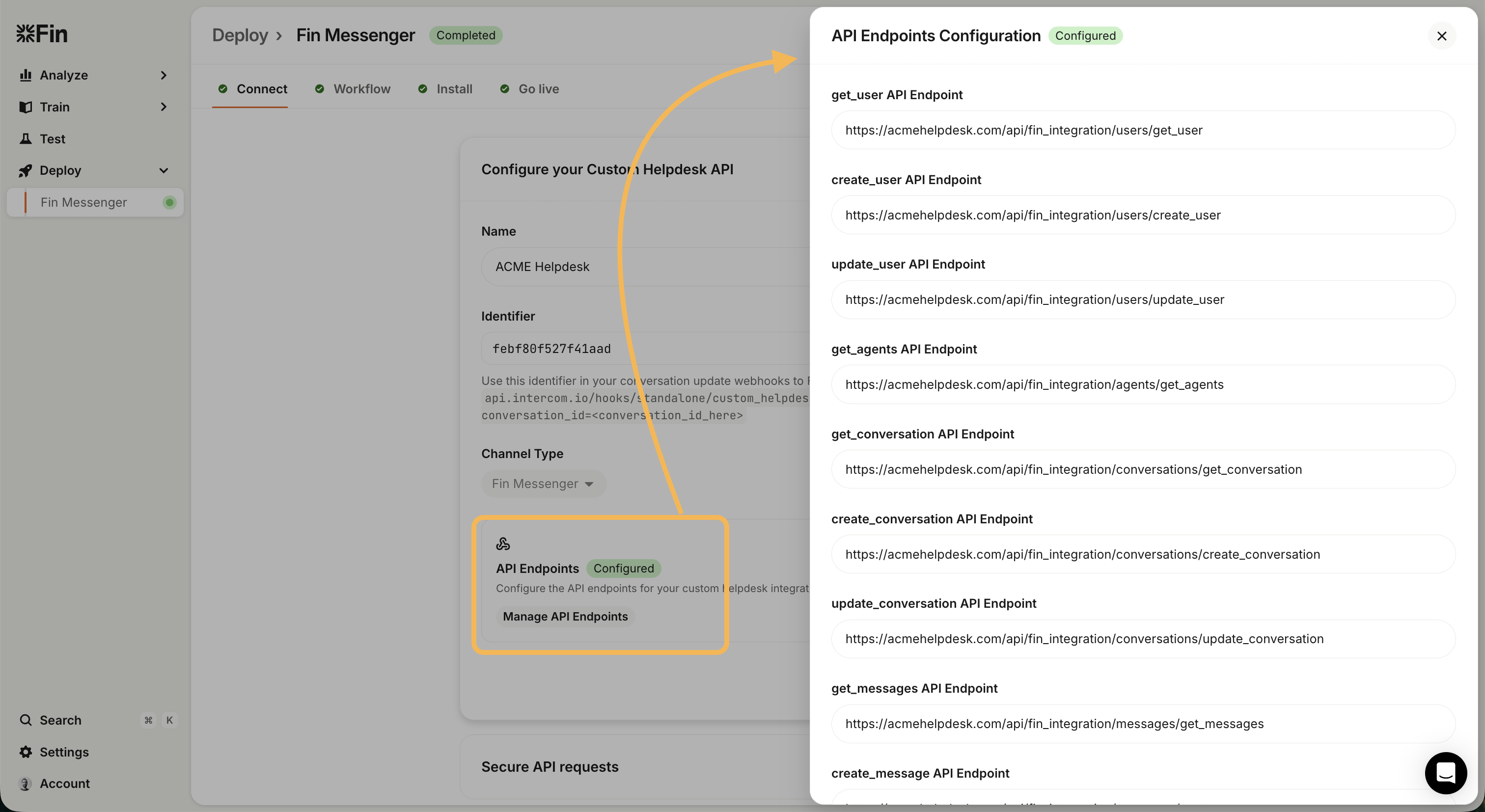 **4** - Set up authentication for your endpoints. By default we use OAuth for this. Choose the "OAuth token settings" option and configure the OAuth connection with your server.
Note, you may whitelist Intercom's IP address ranges based on the [documentation here](https://developers.intercom.com/docs/webhooks#which-ip-addresses-should-i-add-to-my-allowlist-for-intercom-webhooks)
**4** - Set up authentication for your endpoints. By default we use OAuth for this. Choose the "OAuth token settings" option and configure the OAuth connection with your server.
Note, you may whitelist Intercom's IP address ranges based on the [documentation here](https://developers.intercom.com/docs/webhooks#which-ip-addresses-should-i-add-to-my-allowlist-for-intercom-webhooks)
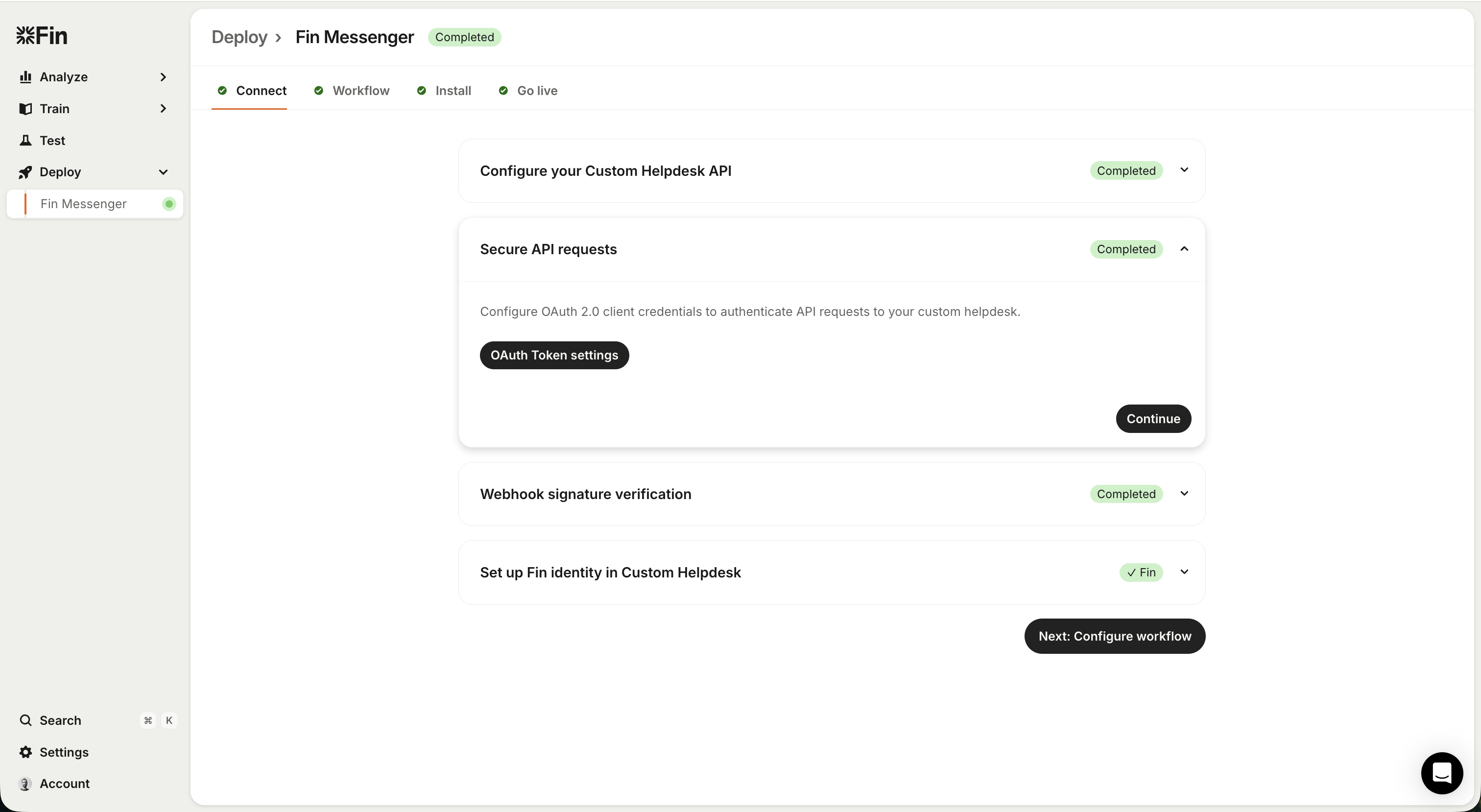
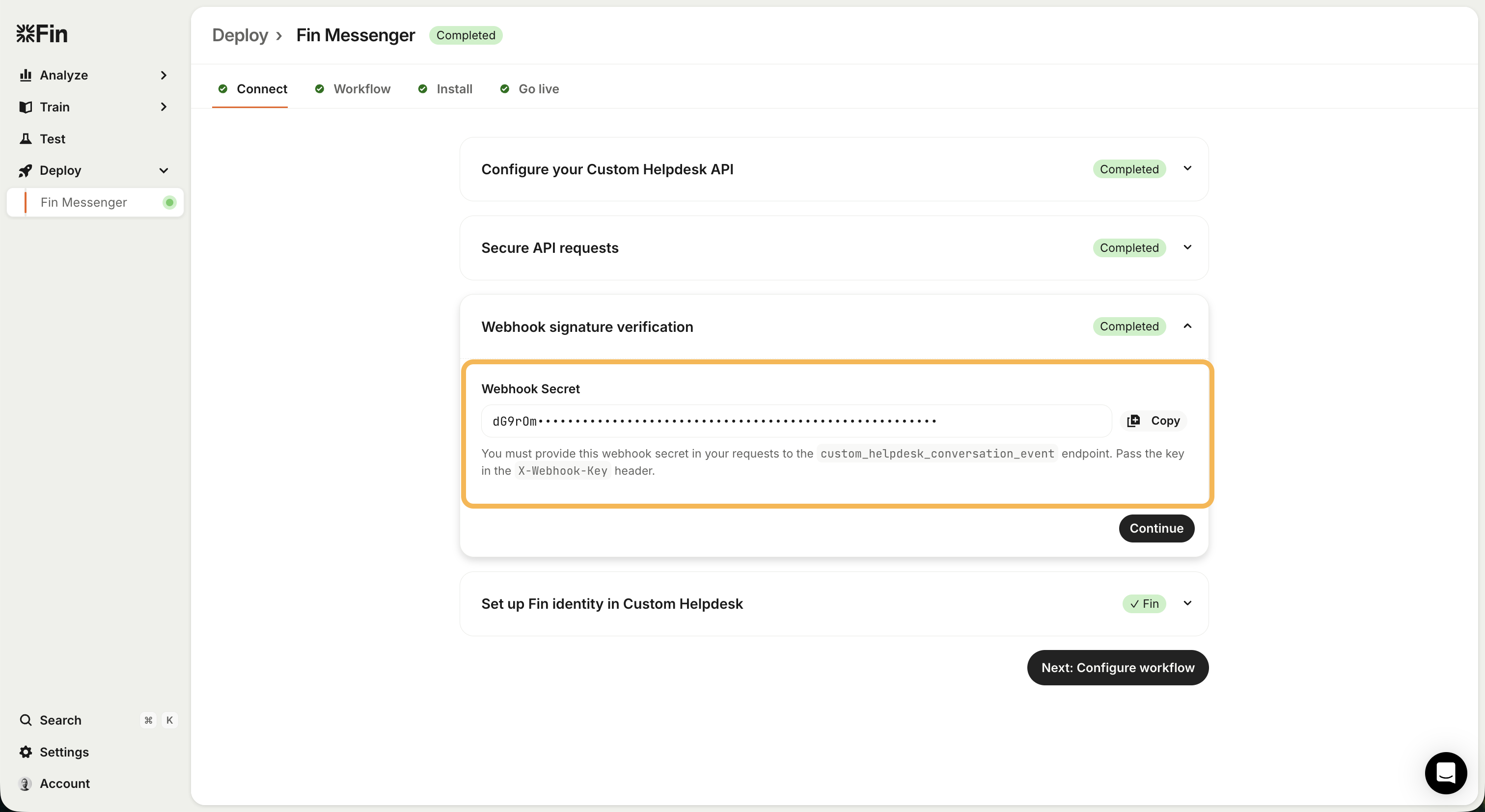
 **5** - Note the webhook secret generated for you. This must be provided in the X-Webhook-Key header in webhook requests to the Fin system.
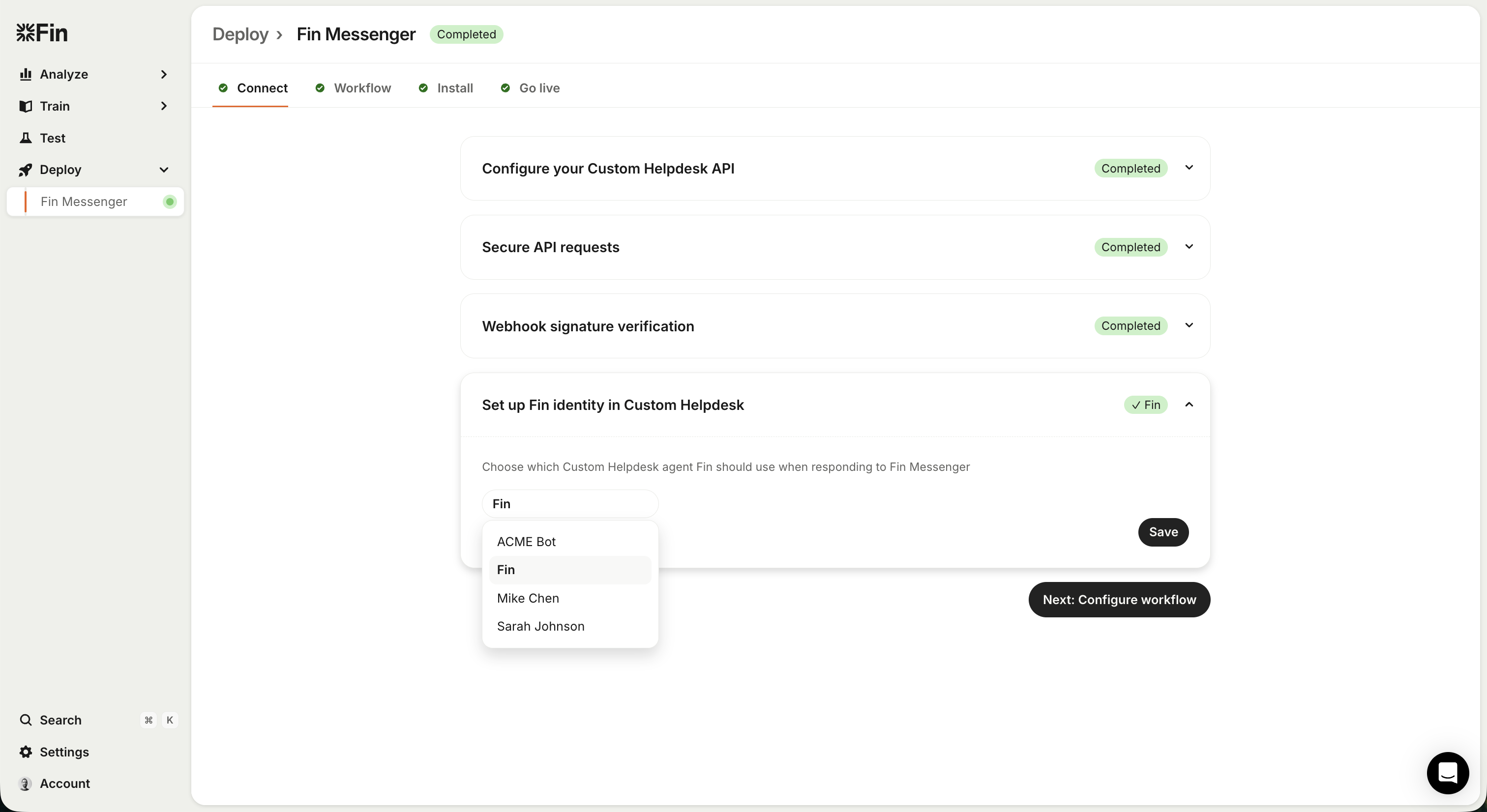
 **6** - Choose a agent from your system to attribute Fin's replies to.
When Fin generate a response for the customer, we will use the ID of the agent chosen here when creating messages in your system.
**6** - Choose a agent from your system to attribute Fin's replies to.
When Fin generate a response for the customer, we will use the ID of the agent chosen here when creating messages in your system.
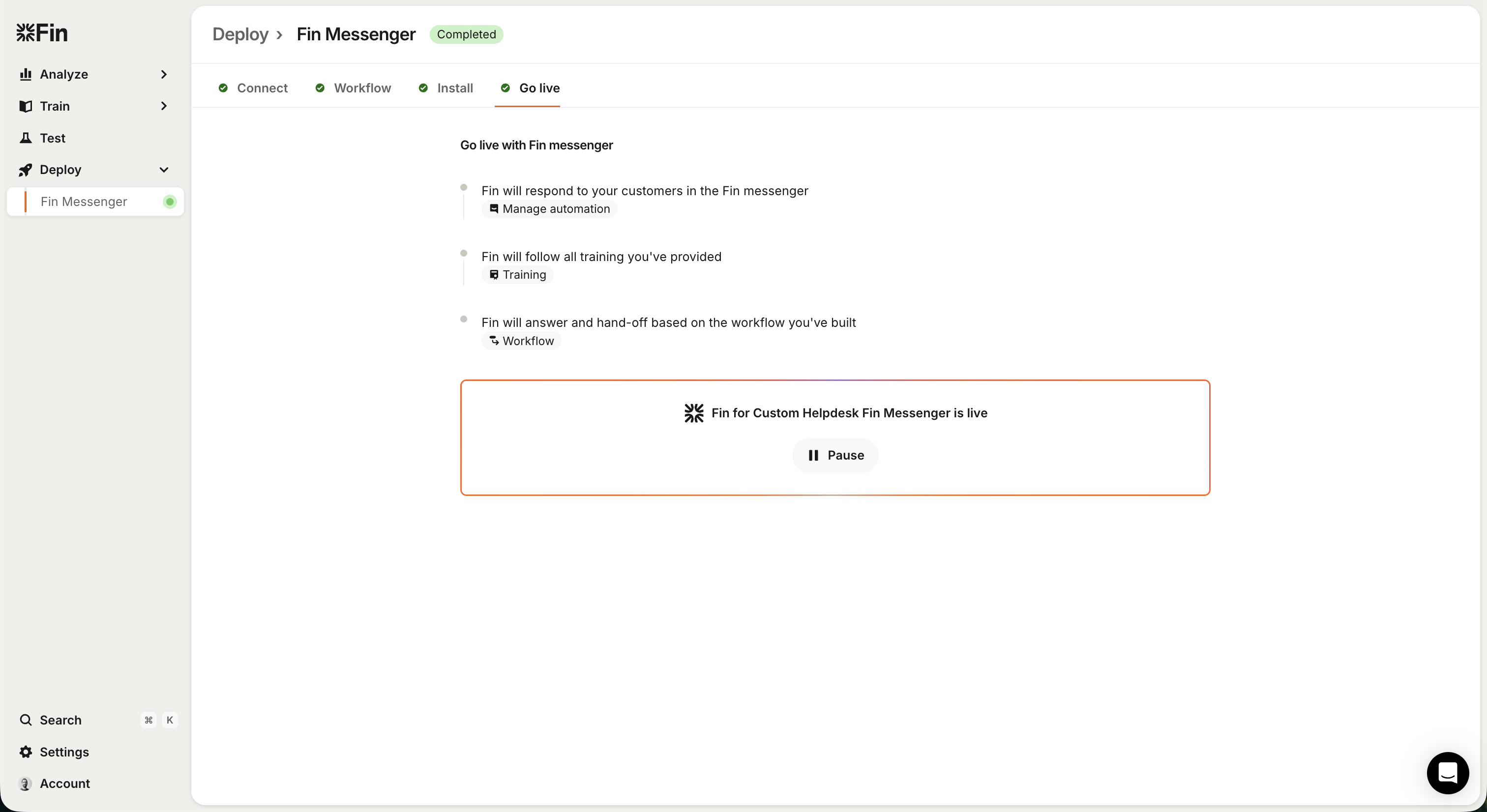
 **7** - Finally, when you've configured your workflow and installed the Fin Messenger you're ready to activate Fin.
 Version: 0.0.1
## Servers
Your Custom Helpdesk API (replace with your actual domain)
```
https://helpdesk.example.com/api/fin
```
## Security
### BearerAuth
OAuth2 access token configured in Fin Deployment UI
Type: oauth2
### WebhookSignature
Webhook key for the custom helpdesk integration. Obtained from Fin Deployment UI.
Type: apiKey
In: header
Name: X-Webhook-Key
## Download OpenAPI description
[Fin Custom Helpdesk API](https://developers.intercom.com/_bundle/docs/guides/fin-custom-helpdesk/api-posts-only.yaml)
## Users
Manage end-users in your helpdesk system
### Get User
- [POST /get_user](https://developers.intercom.com/docs/guides/fin-custom-helpdesk/api-posts-only/users/getuser.md): Retrieve an end-user by their ID.
Used to load an end-user from the customer's system. We will call this during synchronization to get the latest data about the end-user to drive the Fin workflows and tasks correctly.
If using the Fin messenger with a logged in and verified end-user, we will load the end- user when they start a new conversation.
### Update User
- [POST /update_user](https://developers.intercom.com/docs/guides/fin-custom-helpdesk/api-posts-only/users/updateuser.md): Update an end-user by their ID.
### Create User
- [POST /create_user](https://developers.intercom.com/docs/guides/fin-custom-helpdesk/api-posts-only/users/createuser.md): When an end-user starts a conversation in the Fin Messenger and there is no information about them in the third party we request a new record be created.
## Agents
Manage agents in your helpdesk system
### Get Agents
- [POST /get_agents](https://developers.intercom.com/docs/guides/fin-custom-helpdesk/api-posts-only/agents/getagents.md): The customer must choose an Agent from within their own system to act as Fin.
When we tell the customer about responses from Fin, the author ID will be the agent chosen to act as Fin.
## Conversations
Manage conversations between end-users and agents
### Get Conversation
- [POST /get_conversation](https://developers.intercom.com/docs/guides/fin-custom-helpdesk/api-posts-only/conversations/getconversation.md): Used to load a known conversation from the customer's system. Used during ongoing synchronizations.
### Update Conversation
- [POST /update_conversation](https://developers.intercom.com/docs/guides/fin-custom-helpdesk/api-posts-only/conversations/updateconversation.md): Called at the end of a synchronization run to push the latest derived data into the Customer's system.
### Create Conversation
- [POST /create_conversation](https://developers.intercom.com/docs/guides/fin-custom-helpdesk/api-posts-only/conversations/createconversation.md): Called when a new conversation has been created via the Fin Messenger.
Note we provide the initial message from the conversation as we know many help desks require this to be provided when creating a conversation.
The response requires both the conversation object and the message object so that these can be mapped correctly to their Fin equivalents.
## Messages
Manage messages within conversations
### Get Messages
- [POST /get_messages](https://developers.intercom.com/docs/guides/fin-custom-helpdesk/api-posts-only/messages/getmessages.md): Called during synchronization to pull in the messages from the conversation in your system.
Messages which have already been synchronized will be ignored. New messages will be pulled into Fin's version of the Conversation.
### Create Message
- [POST /create_message](https://developers.intercom.com/docs/guides/fin-custom-helpdesk/api-posts-only/messages/createmessage.md): Used during synchronization to push new messages into your helpdesk. These messages may come from either the end-user or Fin.
Note that the author of the Fin messages will be the agent selected to represent Fin on initial setup of the integration.
## Webhooks
Notify Fin when conversations change
### Notify Fin of Conversation Events
- [POST /custom_helpdesk_conversation_event/{integration_id}](https://developers.intercom.com/docs/guides/fin-custom-helpdesk/api-posts-only/webhooks/customhelpdeskconversationevent.md): This endpoint handles two distinct use cases depending on whether an event_type is provided:
## 1. Conversation Synchronization (default behavior)
When you omit the event_type field, Fin will synchronize the conversation by pulling the latest data from your endpoints. Use this when:
- An agent sends a message
- The conversation state changes (status, assignee, etc.)
- Any other conversation data changes that Fin should know about
Example payload:
json
{
"conversation_id": "conv_456"
}
## 2. Agent Typing Indicator
When you set event_type to agent_typing, Fin will display a typing indicator to the end-user in the Fin Messenger. No synchronization occurs - this is purely a real-time UI update.
Use this when an agent starts typing a response in your helpdesk. The typing indicator automatically dismisses after a few seconds.
Important: When using event_type: "agent_typing", the data.agent field is required and must include the agent's id, user_type, name, and email.
Example payload:
json
{
"conversation_id": "conv_456",
"event_type": "agent_typing",
"data": {
"agent": {
"id": "agent_001",
"user_type": "agent",
"name": "Sarah Johnson",
"email": "sarah.johnson@company.com"
}
}
}
Version: 0.0.1
## Servers
Your Custom Helpdesk API (replace with your actual domain)
```
https://helpdesk.example.com/api/fin
```
## Security
### BearerAuth
OAuth2 access token configured in Fin Deployment UI
Type: oauth2
### WebhookSignature
Webhook key for the custom helpdesk integration. Obtained from Fin Deployment UI.
Type: apiKey
In: header
Name: X-Webhook-Key
## Download OpenAPI description
[Fin Custom Helpdesk API](https://developers.intercom.com/_bundle/docs/guides/fin-custom-helpdesk/api-posts-only.yaml)
## Users
Manage end-users in your helpdesk system
### Get User
- [POST /get_user](https://developers.intercom.com/docs/guides/fin-custom-helpdesk/api-posts-only/users/getuser.md): Retrieve an end-user by their ID.
Used to load an end-user from the customer's system. We will call this during synchronization to get the latest data about the end-user to drive the Fin workflows and tasks correctly.
If using the Fin messenger with a logged in and verified end-user, we will load the end- user when they start a new conversation.
### Update User
- [POST /update_user](https://developers.intercom.com/docs/guides/fin-custom-helpdesk/api-posts-only/users/updateuser.md): Update an end-user by their ID.
### Create User
- [POST /create_user](https://developers.intercom.com/docs/guides/fin-custom-helpdesk/api-posts-only/users/createuser.md): When an end-user starts a conversation in the Fin Messenger and there is no information about them in the third party we request a new record be created.
## Agents
Manage agents in your helpdesk system
### Get Agents
- [POST /get_agents](https://developers.intercom.com/docs/guides/fin-custom-helpdesk/api-posts-only/agents/getagents.md): The customer must choose an Agent from within their own system to act as Fin.
When we tell the customer about responses from Fin, the author ID will be the agent chosen to act as Fin.
## Conversations
Manage conversations between end-users and agents
### Get Conversation
- [POST /get_conversation](https://developers.intercom.com/docs/guides/fin-custom-helpdesk/api-posts-only/conversations/getconversation.md): Used to load a known conversation from the customer's system. Used during ongoing synchronizations.
### Update Conversation
- [POST /update_conversation](https://developers.intercom.com/docs/guides/fin-custom-helpdesk/api-posts-only/conversations/updateconversation.md): Called at the end of a synchronization run to push the latest derived data into the Customer's system.
### Create Conversation
- [POST /create_conversation](https://developers.intercom.com/docs/guides/fin-custom-helpdesk/api-posts-only/conversations/createconversation.md): Called when a new conversation has been created via the Fin Messenger.
Note we provide the initial message from the conversation as we know many help desks require this to be provided when creating a conversation.
The response requires both the conversation object and the message object so that these can be mapped correctly to their Fin equivalents.
## Messages
Manage messages within conversations
### Get Messages
- [POST /get_messages](https://developers.intercom.com/docs/guides/fin-custom-helpdesk/api-posts-only/messages/getmessages.md): Called during synchronization to pull in the messages from the conversation in your system.
Messages which have already been synchronized will be ignored. New messages will be pulled into Fin's version of the Conversation.
### Create Message
- [POST /create_message](https://developers.intercom.com/docs/guides/fin-custom-helpdesk/api-posts-only/messages/createmessage.md): Used during synchronization to push new messages into your helpdesk. These messages may come from either the end-user or Fin.
Note that the author of the Fin messages will be the agent selected to represent Fin on initial setup of the integration.
## Webhooks
Notify Fin when conversations change
### Notify Fin of Conversation Events
- [POST /custom_helpdesk_conversation_event/{integration_id}](https://developers.intercom.com/docs/guides/fin-custom-helpdesk/api-posts-only/webhooks/customhelpdeskconversationevent.md): This endpoint handles two distinct use cases depending on whether an event_type is provided:
## 1. Conversation Synchronization (default behavior)
When you omit the event_type field, Fin will synchronize the conversation by pulling the latest data from your endpoints. Use this when:
- An agent sends a message
- The conversation state changes (status, assignee, etc.)
- Any other conversation data changes that Fin should know about
Example payload:
json
{
"conversation_id": "conv_456"
}
## 2. Agent Typing Indicator
When you set event_type to agent_typing, Fin will display a typing indicator to the end-user in the Fin Messenger. No synchronization occurs - this is purely a real-time UI update.
Use this when an agent starts typing a response in your helpdesk. The typing indicator automatically dismisses after a few seconds.
Important: When using event_type: "agent_typing", the data.agent field is required and must include the agent's id, user_type, name, and email.
Example payload:
json
{
"conversation_id": "conv_456",
"event_type": "agent_typing",
"data": {
"agent": {
"id": "agent_001",
"user_type": "agent",
"name": "Sarah Johnson",
"email": "sarah.johnson@company.com"
}
}
}
- ` (unordered), `
- Unordered item 1
- Unordered item 2
- Ordered item 1
- Ordered item 2
- ` (ordered)
Example HTML:
```html
Heading 1
Heading 2
Heading 3
Heading 4
Heading 5
Heading 6
Normal paragraph with a link, bold,
italic, and a line break
right here.
console.log('hello world!');
```
---
## **Agent & Conversation Management**
**Q: Does the get_agent API need conversation ID parameters?**
**A:** No. `get_agent` is only used during initial Fin configuration to select which agent represents Fin in the external system. You can return a single hardcoded bot agent here.
**Q: How will Intercom inform us that a human agent needs to join a conversation?**
**A:** Intercom sends an `update_conversation` call with `assignee_id` set to null.
---
## **Attributes & Data Structure**
**Q: Are conversation-level attributes separate from user attributes?**
**A:** Yes. Structure is:
```json
{
"conversation": {
"attributes": {
// conversation-specific data like locale, topic, sentiment, order_id
},
"user": {
"id": "...",
"type": "end-user",
"name": "...",
"attributes": {
// user-specific custom attributes
}
}
}
}
```
**Q: When EndUser attributes change, will update_conversation be called?**
**A:** Yes. Conversation and user state is synchronized on each inbound/outbound event (new messages, user data updates via workflows, for example an Email Collector step, etc.).
---
## **Request Verification**
**Q: How do I verify that incoming requests are genuine?**
**A:** We provide two extra headers on our requests to your servers:
- `X-Fin-Request-Timestamp` - This is the timestamp of the request (in seconds since epoch). You may use this to reject requests that are too old.
- `X-Fin-Signature` - This is the SHA256 HMAC signature of `{timestamp}:{request_body}`. You may use this to verify the authenticity of the request from us.
Note as there is no body for GET requests, we instead sign: `{timestamp}:{request_params_sorted_alphabetically}`.
The HMAC key used to validate the signature is found in your deployment settings.
---
## **Connecting Fin to your endpoints**
**1** - Navigate to the Deploy > Fin Messenger section in your Fin Workspace.
**2** - You can give your integration a name to identify it. We will support multiple different connections later (e.g. for multiple different sub-brands you may have)
Please note that "Channel type" is currently static with the value "Fin messenger". We will support other channel types at a later time.
Make note of the *Identifier* value you are given here. This is the identifer you must use in your webhooks back to the Fin system.
**3** - Configure your API endpoint URLs. What these endpoints are for and the request/response format is described in the rest of these docs.
**4** - Set up authentication for your endpoints. By default we use OAuth for this. Choose the "OAuth token settings" option and configure the OAuth connection with your server.
Note, you may whitelist Intercom's IP address ranges based on the [documentation here](https://developers.intercom.com/docs/webhooks#which-ip-addresses-should-i-add-to-my-allowlist-for-intercom-webhooks)
**5** - Note the webhook secret generated for you. This must be provided in the X-Webhook-Key header in webhook requests to the Fin system.
**6** - Choose a agent from your system to attribute Fin's replies to.
When Fin generate a response for the customer, we will use the ID of the agent chosen here when creating messages in your system.
**7** - Finally, when you've configured your workflow and installed the Fin Messenger you're ready to activate Fin.
Version: 0.0.1
## Servers
Your Custom Helpdesk API (replace with your actual domain)
```
https://helpdesk.example.com/api/fin
```
## Security
### BearerAuth
OAuth2 access token configured in Fin Deployment UI
Type: oauth2
### WebhookSignature
Webhook key for the custom helpdesk integration. Obtained from Fin Deployment UI.
Type: apiKey
In: header
Name: X-Webhook-Key
## Download OpenAPI description
[Fin Custom Helpdesk API](https://developers.intercom.com/_bundle/docs/guides/fin-custom-helpdesk/api-posts-only.yaml)
## Users
Manage end-users in your helpdesk system
### Get User
- [POST /get_user](https://developers.intercom.com/docs/guides/fin-custom-helpdesk/api-posts-only/users/getuser.md): Retrieve an end-user by their ID.
Used to load an end-user from the customer's system. We will call this during synchronization to get the latest data about the end-user to drive the Fin workflows and tasks correctly.
If using the Fin messenger with a logged in and verified end-user, we will load the end- user when they start a new conversation.
### Update User
- [POST /update_user](https://developers.intercom.com/docs/guides/fin-custom-helpdesk/api-posts-only/users/updateuser.md): Update an end-user by their ID.
### Create User
- [POST /create_user](https://developers.intercom.com/docs/guides/fin-custom-helpdesk/api-posts-only/users/createuser.md): When an end-user starts a conversation in the Fin Messenger and there is no information about them in the third party we request a new record be created.
## Agents
Manage agents in your helpdesk system
### Get Agents
- [POST /get_agents](https://developers.intercom.com/docs/guides/fin-custom-helpdesk/api-posts-only/agents/getagents.md): The customer must choose an Agent from within their own system to act as Fin.
When we tell the customer about responses from Fin, the author ID will be the agent chosen to act as Fin.
## Conversations
Manage conversations between end-users and agents
### Get Conversation
- [POST /get_conversation](https://developers.intercom.com/docs/guides/fin-custom-helpdesk/api-posts-only/conversations/getconversation.md): Used to load a known conversation from the customer's system. Used during ongoing synchronizations.
### Update Conversation
- [POST /update_conversation](https://developers.intercom.com/docs/guides/fin-custom-helpdesk/api-posts-only/conversations/updateconversation.md): Called at the end of a synchronization run to push the latest derived data into the Customer's system.
### Create Conversation
- [POST /create_conversation](https://developers.intercom.com/docs/guides/fin-custom-helpdesk/api-posts-only/conversations/createconversation.md): Called when a new conversation has been created via the Fin Messenger.
Note we provide the initial message from the conversation as we know many help desks require this to be provided when creating a conversation.
The response requires both the conversation object and the message object so that these can be mapped correctly to their Fin equivalents.
## Messages
Manage messages within conversations
### Get Messages
- [POST /get_messages](https://developers.intercom.com/docs/guides/fin-custom-helpdesk/api-posts-only/messages/getmessages.md): Called during synchronization to pull in the messages from the conversation in your system.
Messages which have already been synchronized will be ignored. New messages will be pulled into Fin's version of the Conversation.
### Create Message
- [POST /create_message](https://developers.intercom.com/docs/guides/fin-custom-helpdesk/api-posts-only/messages/createmessage.md): Used during synchronization to push new messages into your helpdesk. These messages may come from either the end-user or Fin.
Note that the author of the Fin messages will be the agent selected to represent Fin on initial setup of the integration.
## Webhooks
Notify Fin when conversations change
### Notify Fin of Conversation Events
- [POST /custom_helpdesk_conversation_event/{integration_id}](https://developers.intercom.com/docs/guides/fin-custom-helpdesk/api-posts-only/webhooks/customhelpdeskconversationevent.md): This endpoint handles two distinct use cases depending on whether an event_type is provided:
## 1. Conversation Synchronization (default behavior)
When you omit the event_type field, Fin will synchronize the conversation by pulling the latest data from your endpoints. Use this when:
- An agent sends a message
- The conversation state changes (status, assignee, etc.)
- Any other conversation data changes that Fin should know about
Example payload:
json
{
"conversation_id": "conv_456"
}
## 2. Agent Typing Indicator
When you set event_type to agent_typing, Fin will display a typing indicator to the end-user in the Fin Messenger. No synchronization occurs - this is purely a real-time UI update.
Use this when an agent starts typing a response in your helpdesk. The typing indicator automatically dismisses after a few seconds.
Important: When using event_type: "agent_typing", the data.agent field is required and must include the agent's id, user_type, name, and email.
Example payload:
json
{
"conversation_id": "conv_456",
"event_type": "agent_typing",
"data": {
"agent": {
"id": "agent_001",
"user_type": "agent",
"name": "Sarah Johnson",
"email": "sarah.johnson@company.com"
}
}
}