To request access to the Fin Agent API, go to Settings > Integrations > Fin Agent API in your workspace and tell us about your use case. Once access is granted, Fin Agent API appears under Fin AI Agent > Deploy.
The Fin Agent API is available on API version 2.14 and above. Make sure your integration uses version 2.14 or later.
Fin can be accessed programmatically via an API. You call Fin from your own agent, and Fin notifies your application of its status and responses through a set of events, delivered via webhooks or Server-Sent Events (SSE).
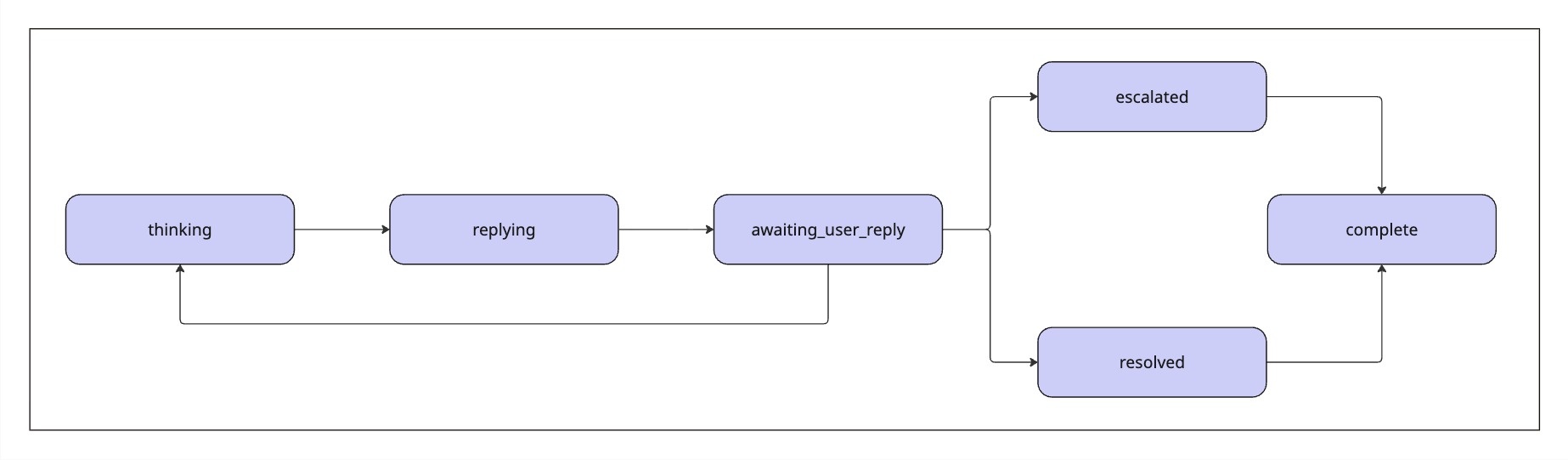
Once Fin is initialized, it works through a series of statuses — thinking as it works on a request and replying as it sends each part of an answer. Fin hands control back to your agent when it reaches awaiting_user_reply (it needs the user's next message to continue) or complete (it has finished). Allow Fin to continue uninterrupted until it returns control with one of these statuses.
You can use Fin in one of two ways, depending on how much control you want to keep over the conversation.
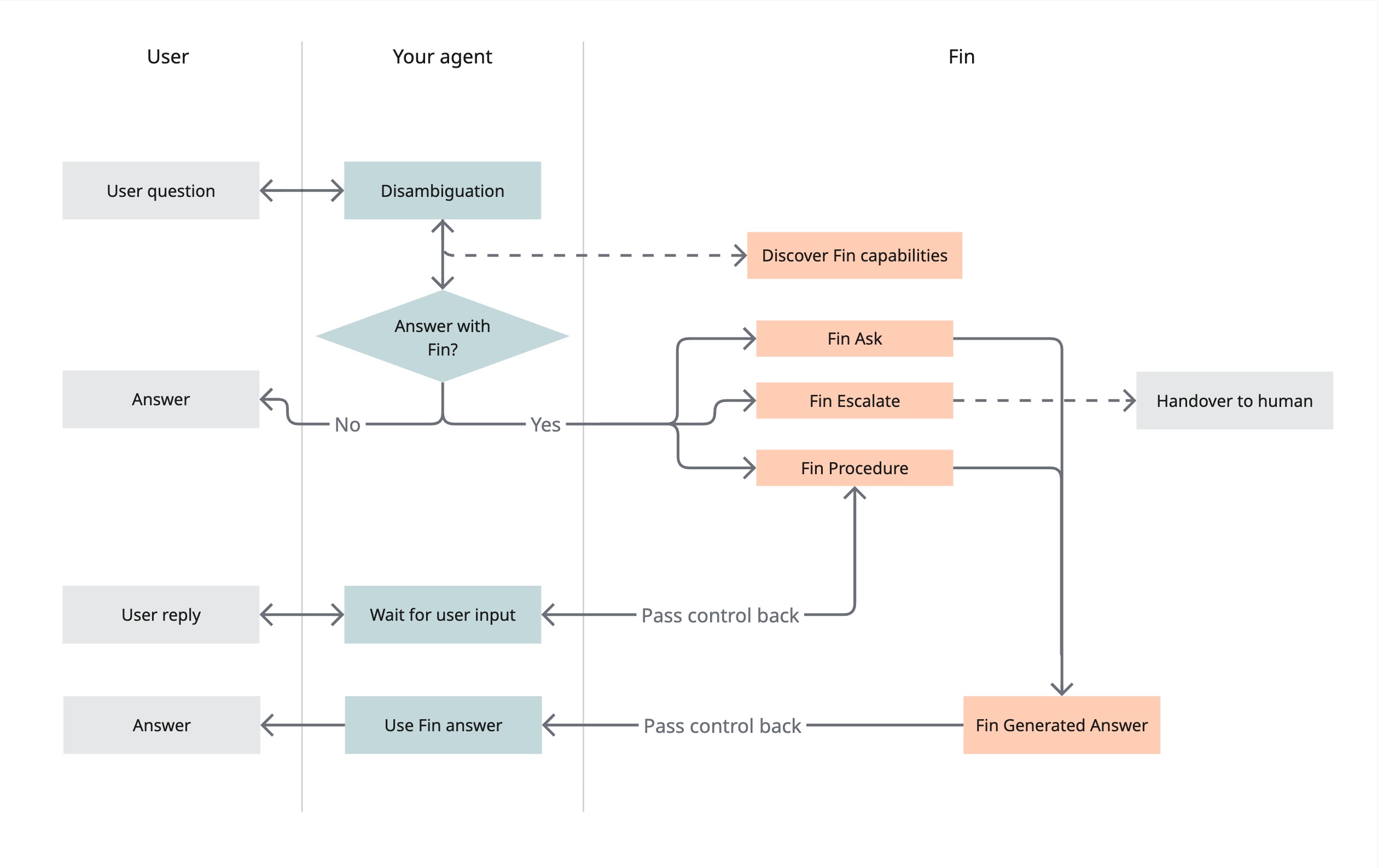
Use Fin as a tool — Your agent stays in control of the turn. It disambiguates the question and decides whether to route to Fin. If it does, it can call Fin capabilities — ask, escalate, or run a procedure — and use the result. Best when you have your own orchestration logic and want Fin to deliver contained answers.
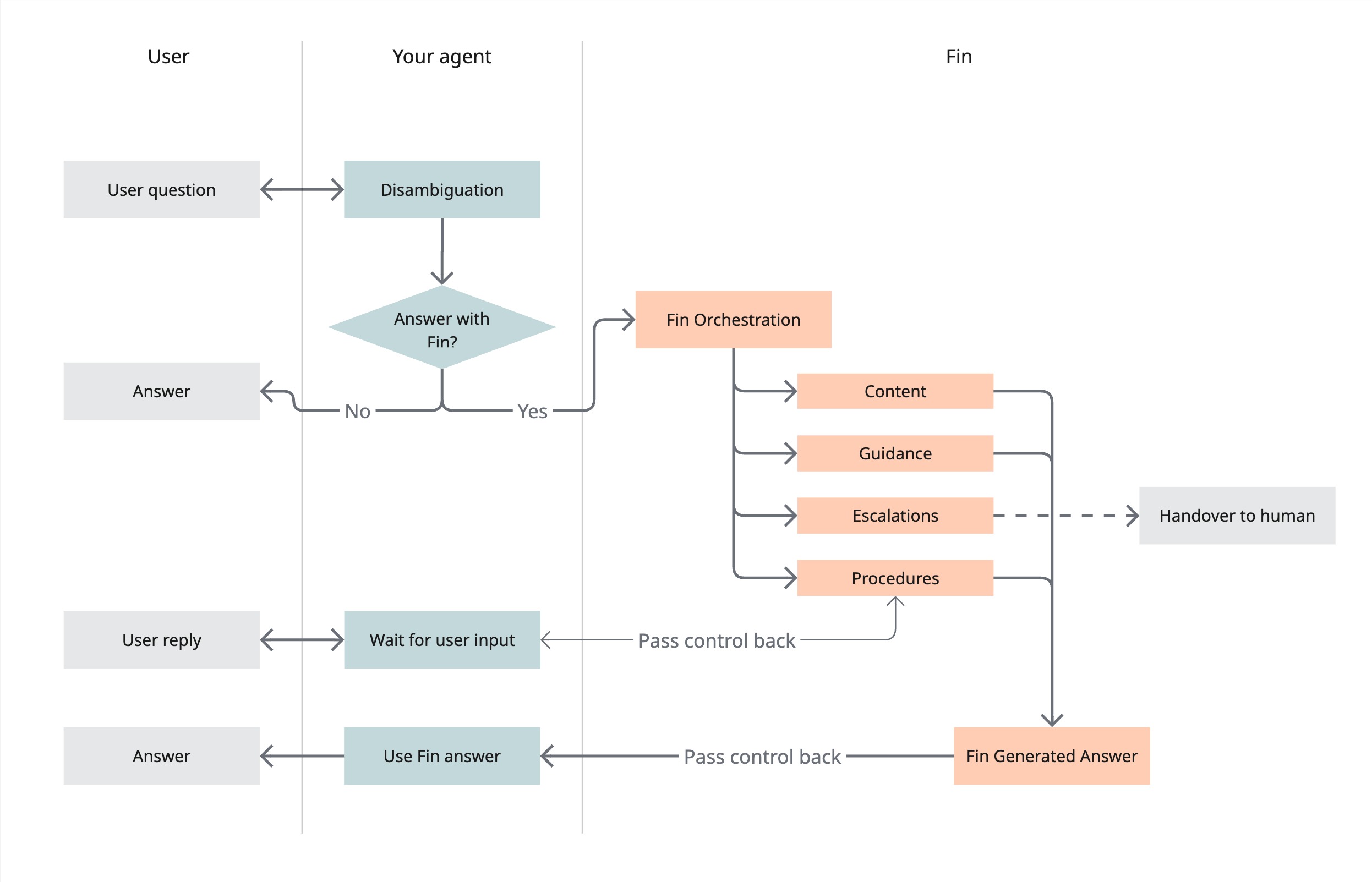
Start a conversation with Fin — Your agent hands the whole turn to Fin. Fin handles the request using its own features: content, guidance, escalations, and procedures. It produces an answer and passes control back. Best when you want Fin to own the resolution end-to-end.
If you are driving Fin from your own agent, the orchestration endpoints let your agent decide what Fin should do and when:
| ENDPOINT | WHEN TO USE |
|---|---|
POST /fin/capabilities | Discover, per user, which procedures and actions are available — call this first to decide what to do. |
POST /fin/ask | Get a single, self-contained answer to one question. Fin will not ask follow-ups, run procedures, or escalate on its own. |
POST /fin/procedures/{procedure_id}/run | Deterministically run a specific procedure. |
POST /fin/reply | Send a follow-up message to an existing conversation — typically when Fin needs more information to complete an action. |
POST /fin/escalate | Hand the conversation off to a human teammate. |
POST /fin/capabilities returns a per-user list of what Fin can do, so your agent can decide which endpoint to call. The list is audience-matched to the user you pass.
| KEY | TYPE | Required | DESCRIPTION |
|---|---|---|---|
user | object | true | The user to list capabilities for. If no user exists for the id, one is created from the supplied details. |
user.id | string | true | The external reference for the user (maps to user_id on the Intercom User object). |
user.name | string | false | The user's name. Applied when the user is created. |
user.email | string | false | The user's email. Applied when the user is created, and updates the existing user's email if it differs. See User Handling. |
user.attributes | object | false | Up to 10 custom attributes. Merged into the user whether it is created or already exists. See User Handling. |
curl -X POST https://api.intercom.io/fin/capabilities \
  -H "Authorization: Bearer <ACCESS_TOKEN>" \
  -H "Intercom-Version: 2.16" \
  -H "Content-Type: application/json" \
-d '{ "user": { "id": "123456" } }'{
"version": "2.16",
"capabilities": [
{ "type": "procedure", "id": "12345", "name": "Reset password",
"description": "Walk the user through resetting their password.",
"endpoint": "/fin/procedures/12345/run", "method": "POST" },
{ "type": "reply", "description": "Reply to an in-progress Fin conversation.",
"endpoint": "/fin/reply", "method": "POST" },
{ "type": "ask", "description": "Ask Fin a single, self-contained question.",
"endpoint": "/fin/ask", "method": "POST" }
]
}POST /fin/ask gets a single, self-contained answer to one question. It is non-conversational: Fin will not ask follow-up questions, run procedures, or escalate on its own. You can still escalate one yourself with /fin/escalate — the ask conversation is already closed after its one-shot answer, and escalation leaves it closed while routing the handoff separately.
| KEY | TYPE | Required | DESCRIPTION |
|---|---|---|---|
conversation_id | string | true | Your external conversation ID. Fin creates a conversation for this ID. If a conversation already exists for it, use /fin/reply instead. |
message | object | true | The user's question. |
message.author | string | true | Who sent the message. One of user, agent, or fin. |
message.body | string | true | The text of the message. |
message.timestamp | string | false | When the message was sent. Optional, but recommended: it is used to deduplicate messages sent within a 5-minute window. |
user | User | true | The user asking the question. Requires id. |
conversation_metadata | object | false | Optional history (up to 10 prior messages) and attributes to give Fin context. |
attachments | array | false | Up to 10 attachments to include with the message. |
environment | string | false | The identifier of the environment to start the conversation in, if your Fin for Platforms workspace has environments. Use the same value as messenger_environment in your Messenger installation. Defaults to the workspace's default environment; an identifier that matches no environment returns a 422. |
curl -X POST https://api.intercom.io/fin/ask \
  -H "Authorization: Bearer <ACCESS_TOKEN>" \
  -H "Intercom-Version: 2.16" \
  -H "Content-Type: application/json" \
  -d '{
    "conversation_id": "ext-123",
    "message": { "author": "user", "body": "How do I reset my password?", "timestamp": "2025-01-24T10:01:20.000Z" },
    "user": { "id": "123456", "name": "John Doe", "email": "john.doe@example.com" }
}'| KEY | TYPE | DESCRIPTION |
|---|---|---|
conversation_id | String | The external ID of the conversation. |
user_id | String | The ID of the user. |
status | Enum<String> | Fin's current status. Values: thinking replying resolved complete |
created_at_ms | String | The timestamp the response was created at, with millisecond precision. |
sse_subscription_url | String | Optional. A URL to subscribe to SSE events for this conversation, returned when SSE is enabled. |
errors | object | Optional. Per-field errors for non-fatal issues, such as user attributes that could not be applied. |
{
  "conversation_id": "ext-123",
  "user_id": "user-456",
  "status": "thinking",
  "created_at_ms": "2025-01-24T10:00:00.123Z",
  "sse_subscription_url": "https://primary-realtime.intercom-messenger.com/event-stream?channels=fin_agent_api:app123:ext-123&accessToken=eyJhbG...&rewind=2m"
}
Fin's answer arrives asynchronously via the fin_replied event. The conversation ends with a complete status — there is no awaiting_user_reply cycle.
Endpoint: /fin/reply
Use /fin/reply to send a follow-up message in an existing conversation. When Fin needs more information to complete an action, it sets the conversation to awaiting_user_reply — send the user's response so Fin can continue.
This endpoint requires user.id, the same as the other orchestration endpoints.
| KEY | TYPE | Required | DESCRIPTION |
|---|---|---|---|
message | Message | true | The user's message. |
conversation_id | String | true | The ID of the conversation. |
user | Object<User> | true | A user object that identifies the user replying to Fin. |
attachments | Array<Attachment> | false | An array of attachments to include with the message. Note: Maximum of 10 attachments. |
Request Payload Example
{
  "message": {
    "author": "user",
    "body": "Here's the information you requested.",
    "timestamp": "2025-01-24T09:01:00.000Z"
  },
  "conversation_id": "ext-123",
  "user": {
    "id": "123456",
    "name": "John Doe",
    "email": "john.doe@example.com",
    "attributes": {
      "plan_type": "Pro",
      "subscription_status": "active"
    }
  },
  "attachments": [
    {
      "type": "url",
      "url": "https://example.com/invoice.pdf"
    }
  ]
}| KEY | TYPE | DESCRIPTION |
|---|---|---|
conversation_id | String | The ID of the conversation. |
user_id | String | The ID of the user. |
status | Enum<String> | Fin's status. |
created_at_ms | String | The timestamp the response was created at, with millisecond precision. Example: 2025-01-24T10:00:00.123Z |
sse_subscription_url | String | Optional. A URL to subscribe to SSE events for this conversation, if SSE is enabled. The JWT token expires after 3 minutes and is revoked when Fin sets the conversation to awaiting_user_reply or complete. When CSAT is enabled and a survey will follow the resolution, complete revocation is deferred until the csat_requested event is delivered or the token expires. |
errors | Object | Optional. Contains error details if any user attribute updates failed. |
errors.user.attributes | Hash<String,String> | Optional. Map of user attribute names to error messages. |
Response Example
{
  "conversation_id": "ext-123",
  "user_id": "user-456",
  "status": "thinking",
  "created_at_ms": "2025-01-24T10:00:00.123Z",
  "sse_subscription_url": "https://primary-realtime.intercom-messenger.com/event-stream?channels=fin_agent_api:app123:ext-123&accessToken=eyJhbG...",
  "errors": {
    "user": {
      "attributes": {
        "invalid_attr": "User attribute 'invalid_attr' does not exist"
      }
    }
  }
}POST /fin/procedures/{procedure_id}/run deterministically runs a specific procedure on a new conversation. Calling it guarantees that procedure runs.
| KEY | TYPE | Required | DESCRIPTION |
|---|---|---|---|
procedure_id (path) | string | true | The ID of the procedure to run. |
conversation_id | string | true | Your external conversation ID. Fin creates a conversation for this ID. If a conversation already exists for it, use /fin/reply instead. |
user | User | true | The user the procedure runs for. Requires id. |
message | object | false | An optional trigger message. If provided, author and body are required. |
conversation_metadata | object | false | Optional conversation attributes (no history). |
environment | string | false | The identifier of the environment to start the conversation in, if your Fin for Platforms workspace has environments. Use the same value as messenger_environment in your Messenger installation. Defaults to the workspace's default environment; an identifier that matches no environment returns a 422. |
curl -X POST https://api.intercom.io/fin/procedures/12345/run \
  -H "Authorization: Bearer <ACCESS_TOKEN>" \
  -H "Intercom-Version: 2.16" \
  -H "Content-Type: application/json" \
  -d '{
    "conversation_id": "ext-123",
    "user": { "id": "123456", "name": "John Doe", "email": "john.doe@example.com" }
}'| KEY | TYPE | DESCRIPTION |
|---|---|---|
conversation_id | String | The external ID of the conversation. |
user_id | String | The ID of the user. |
procedure_id | String | The ID of the procedure that was run. |
status | Enum<String> | Fin's current status. Values: thinking replying awaiting_user_reply resolved complete |
created_at_ms | String | The timestamp the response was created at, with millisecond precision. |
sse_subscription_url | String | Optional. A URL to subscribe to SSE events for this conversation, returned when SSE is enabled. |
errors | object | Optional. Per-field errors for non-fatal issues, such as user attributes that could not be applied. |
{
  "conversation_id": "ext-123",
  "user_id": "user-456",
  "procedure_id": "12345",
  "status": "thinking",
  "created_at_ms": "2025-01-24T10:00:00.123Z",
  "sse_subscription_url": "https://primary-realtime.intercom-messenger.com/event-stream?channels=fin_agent_api:app123:ext-123&accessToken=eyJhbG...&rewind=2m"
}
If the procedure pauses for input, the conversation status becomes awaiting_user_reply — send the user's response with Reply to Fin.
POST /fin/escalate hands a conversation off to a human teammate. If you use the Intercom Helpdesk, the handoff lands in your team inbox. Provide either conversation_id or user:
conversation_id— escalate an existing agent conversation, including one started with/fin/ask. On the Intercom Helpdesk, Fin by default summarises the conversation and opens a new Helpdesk conversation that carries the summary as an internal note. Escalation does not change the original agent conversation's assignment or open/closed state. You can change this default with an escalation Operator Workflow (see below).user— escalate on behalf of a user with no prior agent conversation. On the Intercom Helpdesk, a new Helpdesk conversation is created for the teammate. Not supported on Fin for Platforms — see below.
In both cases, pass the optional context to give the receiving teammate background your orchestrating agent has and Fin does not. On the Intercom Helpdesk, it appears above the summary in the internal note of the new conversation the teammate picks up. It is never shown to the end user.
On Fin for Platforms, context is not surfaced: escalation hands off to your own agent desk rather than creating an Intercom Helpdesk conversation, and the escalation events your platform receives do not carry it. The conversation is also left open there, since your platform keeps driving it.
Escalating an existing conversation also sets its AI Agent resolution state to escalated, readable as ai_agent.resolution_state on the Conversations API. This is a resolution state, not a billable resolution.
By default, an escalation that no workflow handles opens a new Helpdesk conversation on the Intercom Helpdesk. To change what happens on escalate — for example to reassign the existing conversation or route it to a specific team — configure an Operator Workflow triggered by Fin Agent API escalations. When a workflow matches, it takes over the handoff instead of the default.
There is no Intercom Helpdesk on Fin for Platforms, so there is no Helpdesk conversation to create — user is not supported and is rejected. Escalate an existing Fin conversation with conversation_id instead. No Helpdesk conversation is created for a teammate: you're notified with the escalated status and hand the conversation to a human on your own platform.
| KEY | TYPE | Required | DESCRIPTION |
|---|---|---|---|
conversation_id | string | false | The conversation to escalate. Provide this or user. Required on Fin for Platforms, where user is not supported. |
user | User | false | The user to escalate on behalf of, creating a new conversation. Requires id. Provide this or conversation_id. Not supported on Fin for Platforms. |
context | string | false | Background for the receiving teammate, valid with either conversation_id or user. On the Intercom Helpdesk, it appears above the summary in the internal note of the new conversation the teammate picks up, and is never shown to the end user. Up to 10,000 characters. Not surfaced on Fin for Platforms. Avoid including credentials or unnecessary personal data — it is visible to any teammate with access to the conversation. |
Unlike the other orchestration endpoints, user is optional here. Escalate accepts either conversation_id (to escalate an existing agent conversation) or user (to escalate on behalf of a user with no prior conversation) — exactly one of the two is required. On Fin for Platforms only conversation_id is accepted.
| KEY | TYPE | DESCRIPTION |
|---|---|---|
conversation_id | String | Your external conversation ID, echoed back when you escalate an existing conversation by conversation_id. Not returned when escalating on behalf of a user — see intercom_conversation_id. |
status | Enum<String> | The resulting status of the conversation. Value: escalated |
intercom_conversation_id | String | Optional. The internal Intercom conversation ID. Returned when a new conversation was created for the escalation (i.e. when escalating on behalf of a user). |
sse_subscription_url | String | Optional. A URL to subscribe to SSE events for this conversation, returned when SSE is enabled. Includes a rewind window so a subscriber that connects after the escalation is processed can still receive the escalated and complete events. |
You are notified over webhooks or SSE with an escalated status followed by complete. complete signals that Fin is done — it does not close the conversation. On the Intercom Helpdesk, the conversation is routed to your team inbox and stays open there; on Fin for Platforms it stays open for whoever handles it on your own platform.
curl -X POST https://api.intercom.io/fin/escalate \
  -H "Authorization: Bearer <ACCESS_TOKEN>" \
  -H "Intercom-Version: 2.16" \
  -H "Content-Type: application/json" \
-d '{ "conversation_id": "ext-123", "context": "Customer is requesting a refund." }'{
"conversation_id": "ext-123",
"status": "escalated",
"sse_subscription_url": "https://primary-realtime.intercom-messenger.com/event-stream?channels=fin_agent_api:app123:ext-123&accessToken=eyJhbG...&rewind=2m"
}When escalating on behalf of a user, a new conversation is created and the response returns intercom_conversation_id instead of an external conversation_id:
{
  "intercom_conversation_id": "987654321",
  "status": "escalated",
  "sse_subscription_url": "https://primary-realtime.intercom-messenger.com/event-stream?channels=fin_agent_api:app123:987654321&accessToken=eyJhbG...&rewind=2m"
}
Pricing for the Fin Agent API is being finalised and is subject to change.
Conversations you drive through the Fin Agent API are billed the same way as any other Fin conversation — on outcomes. You're charged at most once per conversation, and only when Fin reaches a billable outcome.
A conversation that Fin answers through the API is counted as a resolution, which is a billable outcome. Conversations that don't reach a billable outcome aren't charged — for example, handing a conversation to a human with /fin/escalate without a resolution, or discovering what Fin can do with /fin/capabilities, which doesn't create a conversation.
For how outcomes are calculated and billed, see Understanding Fin outcomes.
Endpoint: /fin/start
Initialise Fin by passing it the user's message along with some conversation history and user details. These additional pieces of context will be used by Fin to provide a better and more contextual answer to the user.
| KEY | TYPE | Required | DESCRIPTION |
|---|---|---|---|
message | Message | true | The message that the user is sending to Fin. |
conversation_id | String | true | The ID of the conversation that is calling Fin via this API. |
user | Object<User> | true | A user object that identifies the user making the query. |
attachments | Array<Attachment> | false | An array of attachments to include with the message. Note: Maximum of 10 attachments. |
conversation_metadata | Object | false | Metadata about the conversation, including history and attributes. |
conversation_metadata.history | Array<Message> | false | An array of previous messages of the conversation before Fin is initialised. This data provides context to Fin on the history of the conversation and helps generate a better answer. Note: Limit to the last 10 messages. |
conversation_metadata.attributes | Hash<String,Object> | false | A Hash of attributes associated with the conversation. These attributes can be used by Fin to provide more contextual responses. Note: Limit to 20 attributes. |
environment | String | false | The identifier of the environment to start the conversation in, if your Fin for Platforms workspace has environments. Use the same value as messenger_environment in your Messenger installation. Defaults to the workspace's default environment; an identifier that matches no environment returns a 422. |
Request Payload Example
{
  "conversation_id": "ext-123",
  "message": {
    "author": "user",
    "body": "How can I see my account details?",
    "timestamp": "2025-01-24T10:01:20.000Z"
  },
  "user": {
    "id": "123456",
    "name": "John Doe",
    "email": "john.doe@example.com",
    "attributes": {
      "plan_type": "Pro",
      "subscription_status": "active"
    }
  },
  "attachments": [
    {
      "type": "url",
      "url": "https://example.com/document.pdf"
    },
    {
      "type": "file",
      "name": "screenshot.png",
      "content_type": "image/png",
      "data": "<base64 encoded file data>"
    }
  ],
  "conversation_metadata": {
    "history": [
      {
        "author": "user",
        "body": "I need help",
        "timestamp": "2025-01-24T10:00:01Z"
      },
      {
        "author": "agent",
        "body": "What do you need help with?",
        "timestamp": "2025-01-24T10:01:00Z"
      }
    ],
    "attributes": {
      "priority_level": "high",
      "department": "sales"
    }
  }
}| KEY | TYPE | DESCRIPTION |
|---|---|---|
conversation_id | String | The ID of the conversation. |
user_id | String | The ID of the user. |
status | Enum<String> | Fin's status. |
created_at_ms | String | The timestamp the response was created at, with millisecond precision. Example: 2025-01-24T10:00:00.123Z |
sse_subscription_url | String | Optional. A URL to subscribe to SSE events for this conversation, if SSE is enabled. Includes rewind=2m to replay recent events. The JWT token expires after 3 minutes and is revoked when Fin sets the conversation to awaiting_user_reply or complete. When CSAT is enabled and a survey will follow the resolution, complete revocation is deferred until the csat_requested event is delivered or the token expires. |
errors | Object | Optional. Contains error details if any user or conversation attribute updates failed. |
errors.user.attributes | Hash<String,String> | Optional. Map of user attribute names to error messages. |
errors.conversation.attributes | Hash<String,String> | Optional. Map of conversation attribute names to error messages. |
Response Example
{
  "conversation_id": "ext-123",
  "user_id": "user-456",
  "status": "thinking",
  "created_at_ms": "2025-01-24T10:00:00.123Z",
  "sse_subscription_url": "https://primary-realtime.intercom-messenger.com/event-stream?channels=fin_agent_api:app123:ext-123&accessToken=eyJhbG...&rewind=2m",
  "errors": {
    "user": {
      "attributes": {
        "invalid_attr": "User attribute 'invalid_attr' does not exist"
      }
    },
    "conversation": {
      "attributes": {
        "bad_attr": "Conversation attribute 'bad_attr' does not exist",
        "priority_level": "'1234' is not a valid value for attribute 'priority_level' of type 'string'"
      }
    }
  }
}Conversations you drive through /fin/start are billed on outcomes. You're charged at most once per conversation, and only when Fin reaches a billable outcome such as a resolution.
For how outcomes are calculated and billed, see Understanding Fin outcomes.
POST /fin/csat records a customer's satisfaction rating for a conversation, with an optional free-text remark.
Fin asks for a rating when a conversation reaches a point where CSAT collection is enabled — this reuses the CSAT settings on your Fin workflow, so you control when a rating is requested from Intercom, not through this API. When Fin asks, it fires a csat_requested event over webhooks or SSE carrying the rating options to show the user. Present those options, then submit the user's choice with this endpoint.
POST /fin/csat and the csat_requested event are available on API version 2.14 and above.
| KEY | TYPE | Required | DESCRIPTION |
|---|---|---|---|
conversation_id | String | true | Your external conversation ID — the same ID you started the conversation with and the one echoed on the csat_requested event. |
rating | Enum<String> | true | The rating the user selected — one of the key values from the csat_requested event's options. Values: terrible bad ok good amazing |
remark | String | false | An optional free-text comment the user left alongside the rating. |
| KEY | TYPE | DESCRIPTION |
|---|---|---|
conversation_id | String | The external ID of the rated conversation. |
rating | Enum<String> | The rating now recorded on the conversation. Values: terrible bad ok good amazing |
status | Enum<String> | The result of the submission. Value: rated |
Submitting the same rating again (with no new remark) is a no-op that succeeds even after the rating window has closed, so an at-least-once client can safely retry. Submitting a different rating updates the stored rating, but only while the rating window is still open. A first remark can be added to an already-rated survey — even after the window has closed — but once a remark has been recorded, the rating is permanently locked and can no longer be changed.
curl -X POST https://api.intercom.io/fin/csat \
  -H "Authorization: Bearer <ACCESS_TOKEN>" \
  -H "Intercom-Version: 2.16" \
  -H "Content-Type: application/json" \
  -d '{
    "conversation_id": "ext-123",
    "rating": "amazing",
    "remark": "Fin solved my problem in seconds."
}'{
"conversation_id": "ext-123",
"rating": "amazing",
"status": "rated"
}A rating that can't be recorded returns a 422 with an errors message. Common causes:
| CAUSE | DESCRIPTION |
|---|---|
| Unknown conversation | No conversation exists for the given conversation_id. |
| No rating requested | The conversation has no rating to record — Fin never fired a csat_requested event for it. |
| Rating window closed | The time window for rating this conversation has passed, per your workspace's CSAT settings. |
| Invalid rating | rating is not one of the supported values. |
| Rating locked | A remark has already been submitted for this rating, so it can no longer be changed. |
Fin fires events during its workflow to convey its status and deliver replies to the user. These events can be received via Webhooks, SSE, or both — for example, using SSE for low-latency UI rendering with webhooks as a reliable fallback.
Both delivery mechanisms provide the same event types with identical schemas.
A webhook endpoint can be configured in the Fin Agent API settings. The client can then listen for Fin events sent to this webhook and handle them accordingly.
All webhook requests will include an X-Fin-Agent-API-Webhook-Signature header containing an HMAC-SHA256 signature of the request body. Validation can be done by generating a signature using the request body and the signing secret from the settings, and comparing it with the aforementioned header value.
Server-Sent Events (SSE) is available by application only. Contact your account team or Customer Support to request access.
You can receive events via Server-Sent Events (SSE) using the sse_subscription_url returned by any endpoint that starts or continues a Fin response cycle — Ask Fin, Reply to Fin, Run a procedure, and Escalate to a human (as well as /fin/start).
- Call any of these endpoints as normal.
- The response includes an
sse_subscription_urlfield. - Open an SSE connection to this URL using
EventSourceor any HTTP client that supports SSE. - Receive
fin_repliedandfin_status_updatedevents in real time over the SSE stream.
The sse_subscription_url follows this format:
https://primary-realtime.intercom-messenger.com/event-stream?channels={channel}&accessToken={token}&rewind={duration}| PARAMETER | DESCRIPTION |
|---|---|
channels | The SSE channel to subscribe to, in the format fin_agent_api:{app_id}:{conversation_id}. |
accessToken | A JWT (JSON Web Token) that authenticates the SSE connection. Expires after 3 minutes and is revoked when Fin sets the conversation to awaiting_user_reply or complete. When CSAT is enabled and a survey will follow the resolution, complete revocation is deferred so the csat_requested event can be delivered first — see Token expiration and revocation. |
rewind | Present on responses that begin a new Fin response cycle (Ask Fin, Run a procedure, Escalate, and /fin/start). Replays events from the specified duration (e.g., 2m for 2 minutes) to prevent missed events during initial connection. Not present on /fin/reply. |
Endpoints that begin a new Fin response cycle — Ask Fin, Run a procedure, Escalate, and /fin/start — return an sse_subscription_url with a rewind=2m query parameter. This instructs the SSE provider to replay any events from the last 2 minutes when the client connects, preventing missed events between receiving the HTTP response and establishing the SSE connection.
The /fin/reply endpoint does not include the rewind parameter, since the client is expected to already have an active SSE connection at that point.
When a response cycle is first started, there is a gap between receiving the HTTP response and opening the SSE connection, so rewind ensures no events are lost during this window. For a /fin/reply continuation, the SSE connection should already be open.
- SSE access tokens expire after 3 minutes.
- The token is revoked immediately when Fin sets the conversation to
awaiting_user_replyorcomplete, unless a CSAT survey will follow (see below). Theawaiting_user_replyrevocation occurs when Fin finishes replying; thecompleterevocation covers flows where the conversation ends without a reply cycle (e.g., immediate escalation). - After receiving
awaiting_user_reply, the SSE connection will close. If the user replies, call/fin/replyto obtain a newsse_subscription_urlwith a fresh token.
When CSAT is enabled on your Fin workflow and a resolution will be followed by a rating survey, complete does not revoke the token or close the stream. The connection is held open so the csat_requested event can be delivered over it, and the token is revoked once that event is sent. Do not close the SSE connection on complete if you want to receive the survey — wait for csat_requested. As a safeguard, if the survey is never sent the token still expires on its own at the 3-minute TTL.
Do not cache or reuse sse_subscription_url values across multiple interactions. Each URL contains a short-lived token scoped to a single Fin response cycle.
// After calling an endpoint that returns an sse_subscription_url (e.g. /fin/ask)
const response = await fetch('https://api.intercom.io/fin/ask', {
  method: 'POST',
  headers: {
    'Authorization': 'Bearer <YOUR_ACCESS_TOKEN>',
    'Content-Type': 'application/json',
    'Intercom-Version': '2.16'
  },
  body: JSON.stringify({ /* request payload */ })
});

const data = await response.json();

// Connect to SSE using the subscription URL
const eventSource = new EventSource(data.sse_subscription_url);

// Set this if CSAT is enabled on your Fin workflow and you want to receive the
// survey. The stream is then left open on `complete` until csat_requested
// arrives, or until the 3-minute token TTL closes it.
const waitForCsat = true;

eventSource.onmessage = (event) => {
  const eventData = JSON.parse(event.data);

  if (eventData.event_name === 'fin_replied') {
    // Handle Fin's reply
    console.log('Fin replied:', eventData.message.body);
  }

  if (eventData.event_name === 'csat_requested') {
    // Present the rating options, then submit the choice with POST /fin/csat.
    eventSource.close();
  }

  if (eventData.event_name === 'fin_status_updated') {
    console.log('Status updated:', eventData.status);

    if (eventData.status === 'awaiting_user_reply') {
      eventSource.close();
    }

    if (eventData.status === 'complete' && !waitForCsat) {
      eventSource.close();
    }
  }
};

eventSource.onerror = (error) => {
  console.error('SSE connection error:', error);
  eventSource.close();
};Fin will report its status to the client via this event.
| KEY | TYPE | DESCRIPTION |
|---|---|---|
event_name | String | The name of the event. Value: fin_status_updated |
conversation_id | String | The ID of the conversation. |
user_id | String | The ID of the user. |
status | Enum<String> | Fin's current status. Supported values: escalated resolved complete awaiting_user_reply |
reason | String | Optional. A human-readable explanation of why the conversation was escalated. Only present when status is escalated. See Escalation Reasons for possible values. |
created_at_ms | String | The timestamp the event was created at, with millisecond precision. Example: 2025-01-24T10:00:00.123Z |
Status Update Example (Escalated)
{
  "event_name": "fin_status_updated",
  "conversation_id": "ext-123",
  "user_id": "7891",
  "status": "escalated",
  "reason": "Escalation requested by user",
  "created_at_ms": "2025-01-24T10:00:00.123Z"
}
Status Update Example (Resolved)
{
  "event_name": "fin_status_updated",
  "conversation_id": "ext-123",
  "user_id": "7891",
  "status": "resolved",
  "created_at_ms": "2025-01-24T10:00:00.123Z"
}
Status Update Example (Awaiting User Reply)
{
  "event_name": "fin_status_updated",
  "conversation_id": "ext-123",
  "user_id": "7891",
  "status": "awaiting_user_reply",
  "created_at_ms": "2025-01-24T10:00:00.123Z"
}The fin_status_updated event with status awaiting_user_reply fires once Fin's reply is done — all reply parts have been sent. Use this event to know when the user can reply.
Fin will reply to a user via this event. The content of the response will be contained in the Message object. Intermediate reply events have a status of replying, indicating that more reply parts may follow. Once Fin's reply is done, a separate fin_status_updated event with status awaiting_user_reply is fired.
The replying status for intermediate fin_replied events — and the fin_status_updated event with awaiting_user_reply that fires once Fin's reply is done — require API version 2.16 and above. On version 2.15 and earlier, every fin_replied event uses awaiting_user_reply as the status and no fin_status_updated event with that status is sent. See the 2.16 changelog for details.
Once Fin finishes and the conversation reaches complete, a csat_requested survey may follow if CSAT is enabled on your Fin workflow.
| KEY | TYPE | DESCRIPTION |
|---|---|---|
event_name | String | The name of the event. Value: fin_replied |
conversation_id | String | The ID of the conversation. |
user_id | String | The ID of the user. |
message | Message | Fin's answer to the user's query. Includes timestamp_ms for millisecond precision timing. |
status | Enum<String> | Fin's current status. Values: replying (intermediate reply) awaiting_user_reply (legacy; see the note above) |
stream_id | String | Optional. Present when the reply was generated via streaming. Correlates this event with the fin_reply_chunk events that preceded it — use it to know when to replace streamed text with the final HTML body. |
message.id | String | A unique identifier for this message. Use this to deduplicate the same reply received via both SSE and webhooks. |
message.sources | Array<Source> | Optional. Available on API version 2.14 and above. The content sources Fin used to generate this reply, in the same order as the [n] citation markers in message.body. Present only when Fin cited content. Each Source has title (String), type (Enum<String>: article or external), and url (String). |
created_at_ms | String | The timestamp the event was created at, with millisecond precision. Example: 2025-01-24T10:00:00.123Z |
Fin Reply Example (Intermediate)
{
  "event_name": "fin_replied",
  "conversation_id": "ext-123",
  "user_id": "7891",
  "message": {
    "id": "98765",
    "author": "fin",
    "body": "<p>You can see your account details by clicking on the <em>Account</em> tab in the top right corner of the screen. [1]</p>",
    "timestamp_ms": "2025-01-24T09:01:00.456Z",
    "sources": [
      {
        "title": "Managing your account",
        "type": "article",
        "url": "https://www.example.com/help/en/articles/1-managing-your-account"
      }
    ]
  },
  "status": "replying",
  "created_at_ms": "2025-01-24T10:00:00.123Z"
}After receiving one or more fin_replied events with status: replying, wait for a fin_status_updated event with status: awaiting_user_reply before prompting the user to reply. This ensures all of Fin's reply parts have been delivered.
When SSE is enabled with streaming, Fin will emit fin_reply_chunk events during reply generation. Each chunk contains the full accumulated answer text so far — not a delta. This allows progressive rendering as Fin types.
fin_reply_chunk events are only delivered over SSE when streaming is enabled. They are not available via webhooks.
| KEY | TYPE | DESCRIPTION |
|---|---|---|
event_name | String | The name of the event. Value: fin_reply_chunk |
conversation_id | String | The ID of the conversation. |
stream_id | String | A unique identifier for this streaming response. Correlates chunks with each other and with the eventual fin_replied event. |
chunk_index | Integer | 0-based counter for this chunk within the stream. Contiguous — no gaps even if tokens are sampled or duplicates skipped. |
chunk_text | String | The full accumulated plain text of Fin's answer so far. Each chunk supersedes the previous — replace rather than append. |
status | Enum<String> | Fin's current status. Value: replying (always replying for this event) |
created_at_ms | String | The timestamp the event was created at, with millisecond precision. Example: 2025-01-24T10:00:00.123Z |
Fin Reply Chunk Example
{
  "event_name": "fin_reply_chunk",
  "conversation_id": "ext-123",
  "stream_id": "a1b2c3d4e5f6a1b2c3d4e5f6a1b2c3d4",
  "chunk_index": 3,
  "chunk_text": "You can see your account details by clicking",
  "status": "replying",
  "created_at_ms": "2025-01-24T10:00:00.123Z"
}Accumulate fin_reply_chunk events keyed by stream_id for progressive rendering. When the fin_replied event arrives with the same stream_id, replace your streamed text with the final HTML in message.body. Discard any late-arriving chunks for that stream_id.
Fin fires this event when it asks the user to rate the conversation. It carries the rating options to present; collect the user's choice and submit it with POST /fin/csat. Unlike the reply events it has no message — a rating survey is a set of options to choose from, not readable text.
Over SSE, this event arrives after Fin reaches complete. Because a survey is expected, the complete status does not close the stream — the connection is held open so this event can be delivered, and the token is revoked once it is sent. Keep your SSE connection open on complete if you want to receive it.
| KEY | TYPE | DESCRIPTION |
|---|---|---|
event_name | String | The name of the event. Value: csat_requested |
conversation_id | String | The ID of the conversation. |
user_id | String | The ID of the user. |
csat | Object | The rating survey to present to the user. |
csat.options | Array<Object> | The ordered rating options to show the user. |
csat.options[].key | Enum<String> | The stable key to send back as rating on POST /fin/csat. Values: terrible bad ok good amazing |
csat.options[].emoji | String | The emoji representing this rating. |
csat.options[].label | String | The human-readable label for this rating, localized to the conversation's detected language. Distinct from key — display the label, but send back the key. |
created_at_ms | String | The timestamp the event was created at, with millisecond precision. Example: 2025-01-24T10:00:00.123Z |
CSAT Requested Example
{
  "event_name": "csat_requested",
  "conversation_id": "ext-123",
  "user_id": "7891",
  "csat": {
    "options": [
      { "key": "terrible", "emoji": "😠", "label": "Terrible" },
      { "key": "bad", "emoji": "🙁", "label": "Bad" },
      { "key": "ok", "emoji": "😐", "label": "Okay" },
      { "key": "good", "emoji": "😃", "label": "Great" },
      { "key": "amazing", "emoji": "🤩", "label": "Amazing" }
    ]
  },
  "created_at_ms": "2025-01-24T10:00:00.123Z"
}As Fin works through a request it reports a series of statuses. Listen for these via Webhooks or SSE and react accordingly.
Which statuses you see depends on the endpoint. Every request reports thinking while Fin works and ends with complete when control returns to you. replying accompanies each reply part. awaiting_user_reply only appears when Fin needs more information to continue (for example, a procedure that pauses for input) — a one-shot Ask Fin call never enters it. escalated is covered below.
| STATUS | DESCRIPTION |
|---|---|
thinking | Fin is currently thinking about a response. When Fin is thinking, the client should consider indicating to the user that Fin is working on an answer. |
replying | Fin is sending reply parts. Each fin_replied event with this status contains a part of Fin's answer. Wait for the fin_status_updated event with awaiting_user_reply before prompting the user to reply. |
awaiting_user_reply | Fin has finished replying and is waiting for the user to respond. This status is delivered via the fin_status_updated event once Fin's reply is done, after all fin_replied events. |
escalated | The conversation has been handed off to a human. This is deterministic when you call /fin/escalate. It can also happen automatically when Fin owns the conversation — /fin/start, and /fin/reply on a conversation started that way, let Fin decide to escalate. Fin will not escalate a one-shot /fin/ask conversation on its own, but you can escalate one yourself. |
resolved | The user's query has been resolved. The user has indicated to Fin that it has successfully answered their query. |
complete | Fin has completed its workflow and the conversation is over. Control of the conversation is now back with the client. When CSAT is enabled, a csat_requested survey may follow — see Token expiration and revocation. |
When a conversation is escalated, the escalated fin_status_updated event carries a reason field.
When you escalate deterministically with /fin/escalate, the reason is always:
| REASON | DESCRIPTION |
|---|---|
Escalation requested via API | You initiated the handoff by calling /fin/escalate. |
The reasons below apply to Fin-decided escalations when Fin owns the conversation — /fin/start, and /fin/reply on a conversation started that way. They aren't emitted by the tool endpoints.
The following reasons may be provided:
| REASON | DESCRIPTION |
|---|---|
Escalation requested by user | The user explicitly requested to speak with a human agent during the conversation. |
Escalation rule: {rule_name} | An escalation rule was triggered based on conversation attributes or conditions. The {rule_name} will be replaced with the actual name of the matched rule. |
Escalation rule matched | A generic escalation rule was triggered, but no specific rule name is available. |
Routed to team | The conversation was routed to a specific team based on your routing configuration. |
Conversation finished without resolution | The conversation ended without being resolved or explicitly escalated through one of the above paths. |
Note: The reason field is optional and may not be present in all escalated status update events. Legacy implementations or certain edge cases may not include this field.
All requests to this API require an API key in the HTTP header. You can obtain an API key after completing the Fin Agent API setup.
For general authentication guidelines, see Intercom authentication.
Your API key grants access to the Fin Agent API on behalf of your workspace. Do not share it publicly or expose it in client-side code.
When you provide a User object to the Fin Agent API, the following behavior applies:
User role only: The Fin Agent API only supports the User role. Leads and Visitors are not supported.
User lookup: The
idfield is used to look up existing users in Intercom. This value maps to theuser_idfield on the Intercom User object.User creation: If no user is found with the provided
id, a new user will be created with the given parameters.Email updates: If an
emailis provided and differs from the existing user's email, the user's email will be updated.Attribute updates: If
attributesare provided, they will be merged with the user's existing attributes. New attributes are added and existing attributes with the same key are overwritten.User data update considerationsIf your users interact with Intercom across multiple channels (e.g., Messenger and the Fin Agent API), updating the email or attributes via this API will affect the user record across all channels. Ensure that the data you provide is authoritative and consistent with your other integrations to avoid unintended changes to user data.
SSE and webhooks serve different purposes and can be used independently or together. Choose based on your integration's needs:
| USE CASE | RECOMMENDED DELIVERY | WHY |
|---|---|---|
| Frontend chat UI with real-time typing | SSE | Reduces time-to-first-token (TTFT) by streaming chunks progressively as Fin generates its reply. Users see text appear immediately rather than waiting for the full response. |
| Backend processing and persistence | Webhooks | Webhooks guarantee delivery of all events including those that occur when no SSE connection is active (e.g., inactivity messages). They are the reliable choice for persisting conversation state to your database. |
| Production frontend + backend | SSE & Webhooks | Use SSE for real-time rendering on the frontend and webhooks for durable backend processing. This gives you the best of both worlds. |
| Server-to-server integration (no UI) | Webhooks | If there is no frontend to render streaming text, webhooks provide complete event delivery without the overhead of maintaining an SSE connection. |
You can enable both SSE and webhooks simultaneously. This is the recommended setup for production integrations — stream to the frontend for a responsive user experience while relying on webhooks to capture every event on the backend.
- Chunks are cumulative plain text — Each
fin_reply_chunkcontains the full accumulated answer text so far, not a delta. You can render the latest chunk directly — no need to concatenate fragments. If you miss a chunk, the next one contains everything. Note thatfin_reply_chunkevents contain plain text only — rich content such as images is not included in chunks and will only appear in the finalfin_repliedevent. - Swap to rich text on completion — When Fin completes its reply, the
fin_repliedevent delivers the final answer as rich text (HTML with formatting, sources, etc.). The recommended strategy: streamfin_reply_chunkevents for real-time display, then replace the streamed text with thefin_repliedrich text for the final rendered view. - Use
stream_idto correlate chunks and replies — Each reply stream has a uniquestream_id. Use it to matchfin_reply_chunkevents to the correspondingfin_repliedevent, especially when handling multiple reply parts.
- Tokens are short-lived — SSE access tokens expire after 3 minutes and are revoked when Fin finishes replying (
awaiting_user_replyorcompletestatus). - CSAT can defer the close — When CSAT is enabled and a survey will follow the resolution,
completedoes not revoke the token or close the stream; the connection stays open so thecsat_requestedsurvey can be delivered, and the token is revoked once it is sent. Keep the connection open oncompleteto receive the survey. If it is never sent, the token still expires at the 3-minute TTL. - Use
/fin/replyfor fresh tokens — After a token is revoked, call the/fin/replyendpoint when the user responds. Each response includes a newsse_subscription_urlwith a fresh token — do not cache or reuse old URLs.
- Persist conversations for page refreshes — SSE is ephemeral. Clients must persist conversation state locally or via their backend and rely on webhooks for updates that arrive while no SSE connection is active (e.g., after a page refresh or reconnection).
- Inactivity messages arrive via webhook only — If Fin times out waiting for a user reply, the inactivity message will not arrive over SSE (the connection will likely have closed by then). Rely on webhooks to capture it.
- Use
message.idto deduplicate across SSE and webhooks — When using both SSE and webhooks, the samefin_repliedevent is delivered on both channels. Eachfin_repliedevent includes amessage.idthat uniquely identifies the message. Use it to detect and discard duplicates. stream_idlinks chunks to the final reply — For streamed replies, usestream_idto correlatefin_reply_chunkevents with the finalfin_repliedevent. Non-streamed replies (e.g., follow-ups) will not have astream_idbut will always have amessage.id.
fin_reply_chunk— Use for progressive rendering. Each chunk contains the cumulative plain-text answer so far with areplyingstatus.fin_replied— Replace the streamed text with thefin_repliedevent's rich-text body for the final rendered view. Usestream_idto match it to the preceding chunks.fin_status_updated— A follow-upfin_status_updatedevent is fired after Fin's replies to indicate the conversation has moved toawaiting_user_reply,resolved, orcompletestatus. Use this to know once Fin's reply is done.
Use a stable API version (e.g., 2.14, 2.15) for production integrations. The Preview version may include experimental changes that are modified or removed before reaching a stable release. See Update your API version for guidance on choosing and upgrading versions.
The message.body field in fin_replied events contains server-rendered HTML. The specific elements that appear depend on the knowledge ingested into Fin — for example, if your help center articles contain tables or code blocks, Fin may include those elements in its responses.
The following HTML elements may appear in message.body:
| Tag | What it does | Details |
|---|---|---|
<p> | Paragraph | Primary text container. |
<h1> <h2> <h3> <h4> | Headings | |
<b> <strong> <i> <em> | Text formatting | Bold and italic. |
<a> | Link | Attributes: href, target. Also used for inline citations (see below). |
<ol> <ul> <li> | Lists | Ordered and unordered. Can be nested. |
<pre> <code> | Code | <pre> wraps <code> for code blocks. Inline <code> for inline snippets. |
<img> | Image | Attributes: src, alt, width, height. Wrapped in a <div> container. |
<table> <tbody> <tr> <td> <th> | Table | Wrapped in a <div>. Cells may have colspan, rowspan. |
<div> | Container | Wraps images, tables, and callout blocks. |
<br> | Line break | |
<hr> | Horizontal rule |
Over time we may add support for new HTML elements in message.body. This will not constitute a breaking change. We advise client code to gracefully handle unknown HTML elements when rendering Fin's responses.